On this page
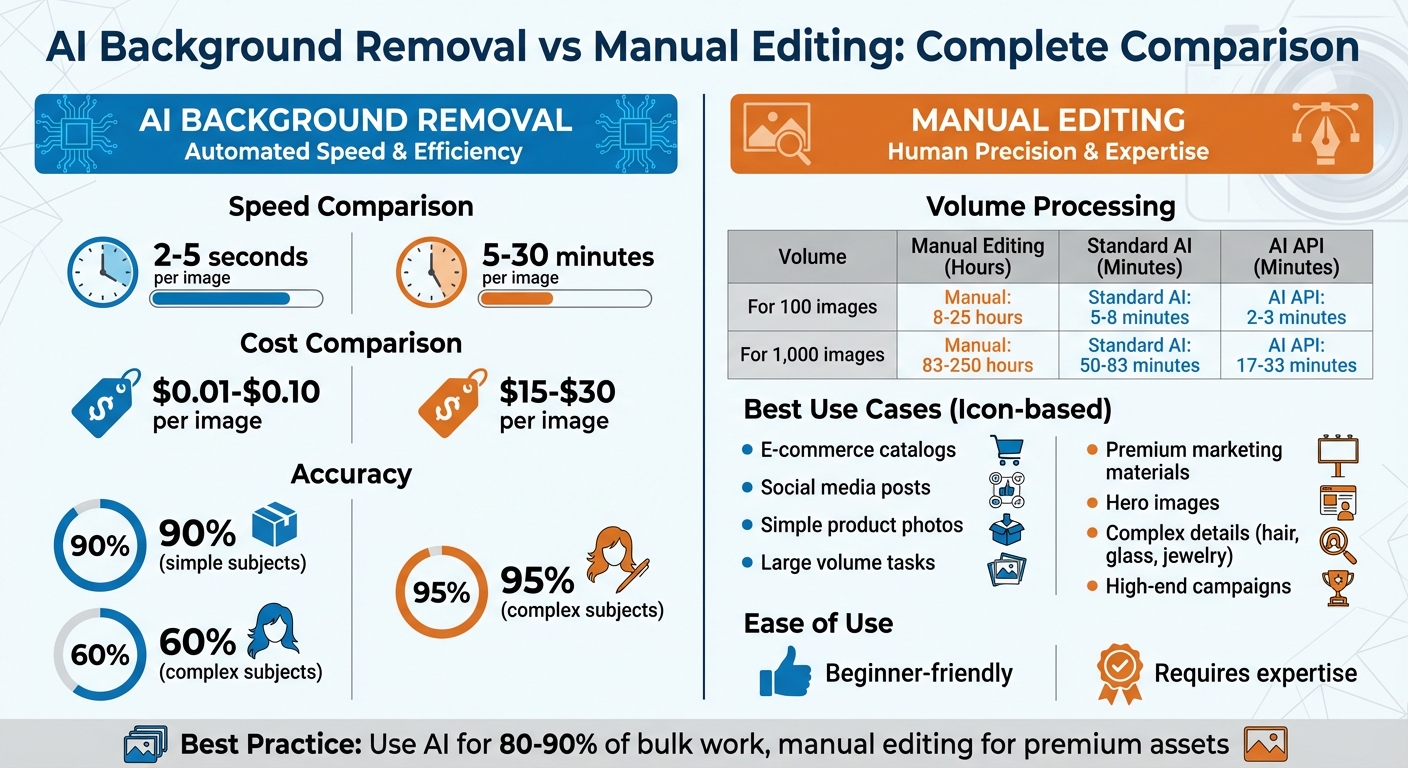
AI background removal is fast, affordable, and ideal for bulk tasks, while manual editing offers precision for complex images. Choosing the right method depends on your needs:
- AI Tools: Process images in 2–5 seconds, cost as little as $0.01 per image, and ensure consistent results across large volumes. Best for e-commerce catalogs, social media posts, and simple product photos.
- Manual Editing: Takes 5–30 minutes per image, costs $15–$30 per image, and delivers high-quality results for intricate details like hair, glass, or jewelry. Perfect for premium marketing materials or hero images.
Quick Comparison:
| Criteria | AI Tools | Manual Editing |
|---|---|---|
| Speed | 2–5 seconds/image | 5–30 minutes/image |
| Cost | $0.01–$0.10/image | $15–$30/image |
| Accuracy | 90% (simple subjects) | 95% (complex subjects) |
| Best Use Cases | Large catalogs, e-commerce | High-end campaigns, intricate details |
| Ease of Use | Beginner-friendly | Requires expertise |
AI excels in speed and scalability, while manual editing provides unmatched precision. For most businesses, combining AI for bulk tasks and manual editing for detailed work strikes the best balance.
Speed and Efficiency
Processing Time Comparison
The gap in processing time between manual editing and AI-powered background removal is massive. Using Photoshop for manual edits can take anywhere from 5 to 15 minutes per image, depending on the complexity of the product. On the other hand, AI background removal through an API can handle the same task in just 1 to 3 seconds. As the Removedo Team aptly stated:
“What used to take 15 minutes per photo now takes 3 seconds.” – Removedo Team
To put this into perspective, processing 200 images manually could take 17 to 50 hours, while AI can process the same volume in just 3 to 10 minutes. Scaling up to 1,000 images, manual editing might consume around 116 hours, compared to just 1.4 hours with AI - a time and cost reduction of nearly 90%. AI APIs can handle 30 to 60+ images per minute by processing requests in parallel. For businesses like spare parts distributors or asset recovery companies dealing with hundreds of items weekly, this speed translates into faster product listings and quicker market availability. When inventory volumes grow, these time savings become even more critical.
Scalability for High-Volume Operations
Manual editing struggles to keep up with high-volume demands. Scaling up requires hiring additional editors, and even then, quality often drops after just a few hours of repetitive work due to fatigue. In contrast, AI tools deliver consistent results, ensuring precise edge detection and background removal regardless of the workload.
| Method | Time per Image | 100 Images | 1,000 Images |
|---|---|---|---|
| Manual (Photoshop) | 5–15 minutes | 8–25 hours | 83–250 hours |
| Standard AI Tool | 2–5 seconds | 5–8 minutes | 50–83 minutes |
| AI API (Parallel) | 1–3 seconds | 2–3 minutes | 17–33 minutes |
For large-scale projects, such as catalog launches or processing batches of over 10,000 images, integrating an AI API becomes indispensable. Tools like AutomaSnap go a step further by combining AI background removal with automated data extraction from nameplate photos. This creates a streamlined workflow that moves seamlessly from product intake to ERP-ready spreadsheets, eliminating delays. The reliability and speed of AI tools not only accelerate product listing but also drive revenue growth, allowing businesses to focus on market readiness without bottlenecks.
Accuracy and Quality
Edge Detection and Precision
When it comes to edge detection, the choice between AI and manual methods depends on the specific subject you’re working with. AI tools, powered by advanced neural networks like U2-Net, analyze edges, textures, and colors to identify subject boundaries. Recent advancements, such as “soft masking”, allow AI to assign fractional opacity to edge pixels, creating smoother transitions. This is a clear step up from older tools that often produced “stair-stepped” artifacts. However, AI still struggles in low-contrast scenarios, like distinguishing blonde hair from a cream-colored background. In these cases, it can misjudge edges and include unwanted background pixels.
On the other hand, manual editing with tools like the Photoshop Pen Tool offers unmatched precision for hard edges, especially in objects like packaging, metal, or geometric shapes. Professional editors can zoom in up to 500x, ensuring every pixel is accounted for - something AI cannot replicate for high-end commercial projects. While AI tools can achieve up to 90% accuracy for simple subjects, their performance drops to around 60% for complex subjects like hair or fur. Manual methods, however, can achieve up to 95% accuracy even for intricate details.
For standard e-commerce platforms like Amazon or Shopify, AI tools are generally sufficient and meet marketplace standards. However, for hero images or premium print campaigns, manual retouching is often necessary to correct AI errors or achieve a polished result. As Path Edits explains:
“AI technology, while amazing, isn’t quite perfect. Many AI background removals come back with imperfections. Manual retouching may be faster than correcting AI errors.”
For challenging subjects like glass, liquids, jewelry chains, or lace, manual editing remains the preferred option. It provides superior control over reflections, depth, and intricate details.
Beyond edge detection, another critical factor is maintaining uniformity across multiple images.
Consistency Across Images
When it comes to batch consistency, AI has a clear advantage. By applying the same algorithmic logic to every image, AI ensures uniform results across large volumes of photos. This consistency is crucial for businesses managing hundreds of product images weekly, as it guarantees a standardized appearance across an entire catalog. Manual editing, in contrast, depends heavily on the skill and focus of the individual editor, which can lead to variations between different editors or even within a single session.
Manual editing also faces challenges like fatigue, which can impact both quality and consistency over time. While 75% of photographers prefer manual background removal for its precision and control, 85% favor AI tools for their reliability in high-volume tasks. For workflows like those in AutomaSnap, where background removal is just one part of a larger automated process, AI’s consistent output ensures smooth transitions from intake to ERP-ready spreadsheets, keeping operations efficient and error-free across the board.
Skill Requirements and Learning Curve
Technical Expertise
The expertise needed for manual editing sets it apart from AI-based methods. Mastering manual editing tools like the Pen Tool, layer masks, alpha channels, and refine-edge brushes can take months of dedicated practice. These tools are essential for handling intricate details, and advanced techniques like color decontamination and shadow reconstruction add an extra layer of complexity to the process.
For example, a skilled editor might spend 10–30 minutes on a single complex image. Tasks like manually masking a bicycle with its intricate spokes can easily take over 30 minutes to perfect. This level of precision requires not just technical know-how but also a keen artistic eye.
On the other hand, AI tools significantly lower the barrier to entry. Users don’t need advanced technical skills because the process is largely automated. Instead of focusing on manual adjustments, users shift their attention to quality checks and minor tweaks. This makes the learning curve for AI tools much less daunting compared to the steep mastery required for manual editing.
Ease of Use for Non-Experts
Manual editing demands specialized skills and software, which can be a challenge for those without formal training. In contrast, AI background removal tools make the process as simple as a single click. This ease of use is especially appealing to marketers, small business owners, and social media managers who don’t have graphic design expertise.
Consider the costs and requirements: Adobe Photoshop, for instance, costs around $22.99 per month (totaling over $275 annually) and requires a high-performance computer to handle its large software installation. Meanwhile, most AI tools are browser-based, eliminating the need for installations or powerful hardware.
The difference in time efficiency is just as striking. AI can remove a background in 3–10 seconds, while a skilled manual editor might need 10–30 minutes for the same task. For bulk tasks, the advantage becomes even more apparent. A batch of 50 images that could take 2–4 hours in Photoshop can be processed by AI in just 3–5 minutes, with virtually no manual effort required. This accessibility allows team members in marketing and merchandising to create ready-to-use assets quickly, without relying on a dedicated retoucher.
Cost Considerations
Upfront and Ongoing Expenses
AI background removal tools are generally budget-friendly, often available through subscription or credit-based plans. For instance, Photoroom starts at $9.99/month, Remove.bg offers 40 credits for $9/month, and Claid AI provides tiered plans ranging from $29 to $299/month.
On the other hand, manual editing comes with a significantly higher upfront investment. Adobe Creative Cloud costs $22.99/month for Photoshop alone or $59.99/month for the full suite. Additionally, manual editing requires high-performance hardware. Labor costs are the most substantial expense: basic manual editing services charge between $0.25 and $0.39 per image, while high-precision work can cost anywhere from $15 to $30 per image. For in-house editing, staff time is estimated to cost $1–$5 per image.
The financial impact becomes more pronounced when scaling up. For example, editing an e-commerce catalog of 500 SKUs with four angles each - totaling 2,000 images - can cost around $2,000 per session with outsourced manual clipping paths at $1 per image. In contrast, enterprise AI tools can process images for as little as $0.01 each.
Value for Money
The choice between AI tools and manual editing often comes down to the volume of work and quality expectations. As image volumes increase, the cost differences become more significant. AI tools excel in high-volume operations where speed is crucial. Tasks that take 15–30 minutes manually are completed in seconds with AI. While a manual editor might manage only 5–10 high-quality images daily, AI tools can handle hundreds.
“Per-image pricing models (Remove.bg) become expensive quickly. Subscription models (Photoroom, AI Magicx) offer dramatically better economics at scale.” - AI Magicx
However, manual editing is still the go-to choice for “hero” images - those used in premium print campaigns, intricate jewelry photography, or transparent glassware, where precision is critical. For routine e-commerce packshots or social media content, AI tools provide a speed advantage that can directly influence revenue. The best approach depends on the strategic importance of the asset. By leveraging AI for less critical tasks, businesses can allocate resources to more impactful, revenue-generating activities.
Best Use Cases and Practical Applications
When to Choose AI Background Removal
AI background removal is a game-changer for operations that prioritize speed and volume. Industries like spare parts distribution and asset recovery see great benefits because their inventories - such as metal components, electronics, tools, and packaged goods - typically feature well-defined edges that AI handles with precision.
Take this example: processing 150 product photos manually in Photoshop can take 8–12 hours. With AI, the same task is completed in just 15–20 minutes - a staggering 95% reduction in time. This speed enables businesses to list products the same day, accelerating revenue generation.
Marketplaces often require pure white backgrounds (RGB 255,255,255) to avoid listing suppression. AI tools deliver this instantly. Tools like AutomaSnap go a step further by automating background removal and extracting structured data from nameplate photos. This makes the process - from photo capture to ERP-ready spreadsheets - smooth and efficient. It also integrates seamlessly with automated inventory workflows offered by platforms like AutomaSnap.
AI also levels the playing field for those without advanced design skills. Marketing teams, social media managers, and merchandising staff can create professional, market-ready images for platforms like eBay, social media, or email campaigns without the need for Photoshop expertise. This eliminates bottlenecks and provides a competitive edge.
However, while AI excels in high-volume, straightforward tasks, there are cases where its capabilities fall short.
When to Opt for Manual Editing
When precision is non-negotiable, manual editing becomes indispensable. Complex items like jewelry chains, bicycles, or machinery parts with intricate gaps and overlaps require the detailed touch of a skilled editor. Similarly, reflective, transparent, or low-contrast items - such as wine glasses, clear plastic packaging, chrome components, or light-colored objects on cream backgrounds - can challenge AI algorithms, making manual intervention essential.
In many challenging scenarios, a hybrid approach works best: AI handles 80–90% of the workload, while manual refinement ensures every detail is perfect.
For premium assets, manual editing guarantees pixel-perfect results. As Luisa Bell from Masking Aid explains:
“AI tools are based on algorithms and cannot be truly creative. It can’t interpret a unique vision for a photo in the same way a human can.”
When every detail counts, investing $15–$30 per image for professional manual editing can deliver results that justify the cost.
Integration with Inventory Workflows
AI Tools in Automated Workflows
AI-powered background removal is reshaping how businesses manage inventory workflows by cutting out the need for tedious manual file handling. Using REST APIs, companies can automate the process as soon as a product photo is uploaded, saving both time and effort.
Here’s the difference in numbers: processing 200 images manually can take anywhere from 17 to 50 hours, costing approximately $425–$1,250 (assuming a $25/hour rate). In comparison, an API-based AI solution can handle the same workload in just 3–10 minutes, with costs ranging from $0 to $40. That’s up to 300 times faster and significantly cheaper.
Platforms like AutomaSnap push this efficiency even further. They not only remove backgrounds but also extract structured data like Brand, MPN, and Serial Number from product photos. The result? ERP-ready spreadsheets that seamlessly integrate with systems like SAP, Odoo, and Dynamics 365. This creates a smooth pipeline, moving directly from photos taken on the shop floor to marketplace-ready product listings.
For businesses managing large inventories, AI tools also simplify bulk operations. Processed image URLs can be automatically mapped to product SKUs in CSV files or Amazon Flat Files, making it easier to scale.
In contrast, manual workflows quickly become a bottleneck, slowing down operations and delaying product launches.
Manual Editing Workflow Compatibility
While AI integration speeds things up, manual editing still struggles with inefficiencies. Every image requires individual attention - opening it in Photoshop, masking it, saving it with the correct naming convention, and then manually uploading it to the product database. For instance, launching 50 products with four images per item means handling 200 edits before the inventory can even go live.
Let’s do the math: a professional editor working at a rate of 8–12 images per hour would need 83–250 hours to process 1,000 images. Outsourcing to retouching services might seem like a solution, but it often introduces overnight delays, pushing product launches back by several days or even weeks. And without programmatic tools or automatic export capabilities to ERP systems, maintaining consistency across thousands of images becomes a daunting task. Editor fatigue only adds to the risk of errors as the workload increases.
AI Background Removal That ACTUALLY Works (Hair, Fur & Transparency Tested)
Conclusion
Choosing between AI and manual background removal comes down to the complexity of your images and the volume of work. AI can process images in seconds, making it perfect for large-scale tasks like social media posts or product catalogs. On the other hand, manual editing, which can take up to 30 minutes per image, is better suited for intricate, high-detail projects.
When it comes to costs, AI subscription plans range from $24 to $199 per month, offering a budget-friendly solution for large-scale operations. In contrast, manual editing costs $15–$30 per image, making it a pricier option for high-volume needs. AI not only speeds up the workflow but also integrates smoothly with inventory systems, streamlining the entire process.
“AI background removal is ideal for bulk processing and simple tasks, while manual editing shines in scenarios like high-end promotional pieces that require extra care.” – Ethan Brookes, SEO Content Writer, Logo Diffusion
A combined approach can offer the best results. For instance, letting AI handle 80–90% of the workload and reserving manual touch-ups for tricky areas - like fine hair, transparent objects, or low-contrast edges - can strike a good balance.
For everyday product listings on platforms like Amazon or Shopify, AI background removal is a ready-to-go solution. However, when you need visuals with flawless precision for premium marketing materials, manual editing still leads the way. By leveraging AI for standard tasks and manual editing for high-end visuals, you can effectively balance quality, speed, and cost. Tools like AutomaSnap highlight how AI can play a strategic role in boosting efficiency while aligning with your workflow and inventory needs.
FAQs
How do I know when AI removal is “good enough” for my product photos?
AI background removal works well when the background is clearly separated from the subject, textures remain intact, and there are few noticeable flaws like halos or jagged edges. Always check that the final image aligns with your quality expectations, particularly for tasks like e-commerce or high-volume projects.
What kinds of products usually need manual touch-ups after AI removal?
Products with detailed edges, delicate textures, or intricate designs often require some manual adjustments after AI removes the background. Items like hair, fur, transparent materials such as glasses or jewelry, fabric with fringes, plant leaves, or semi-transparent packaging can be particularly tricky. AI tools sometimes struggle to capture these fine details perfectly, which can result in missed areas or unwanted artifacts. To achieve a clean and polished finish, manual touch-ups are often necessary.
Can I automate background removal and data capture into my ERP with AutomaSnap?
AutomaSnap takes the hassle out of background removal and data capture for your ERP system. It makes inventory intake easier by pulling structured data - like brand details and serial numbers - and generating spreadsheets that are ready to upload into your ERP. This helps smooth out your workflow and saves you valuable time.