







Snap the nameplate. Get ERP-ready data.

Stop manual typing. Snap a photo to extract Brand, MPN, and Serial instantly. Clean the background, export to ERP, and move inventory 15x faster.

Clear workflow → predictable results

From label photo to ERP-ready rows.

The “job” AutomaSnap does: capture the right fields fast, reduce errors, and produce clean spreadsheets you can actually import into ERP — with photo proof attached.

Take a label photo
1

Take a label photo

Capture the nameplate (and a quick part photo if you want). Built for real intake work—not perfect studio shots.

Get structured fields
2

Get structured fields

AutomaSnap extracts Brand, MPN, Serial Number and key specs as fields you can review and edit in seconds.

Export to ERP
3

Export to ERP

Download your inventory as import-ready spreadsheets for SAP, Odoo, Dynamics 365, or BaseLinker.

Manual work doesn’t scale. AutomaSnap does.

Compare the manual 10-minute intake process against the automated 40-second workflow. Stop wasting time on typing and re-checking—let AI handle the extraction while you focus on moving inventory.

Manual Intake

The old, slow way

+10-20 min
Manual scanning process
Find / read the label
Interpret fields (Brand / MPN / SN)
Check market prices (eBay / Automanet)
Type into a spreadsheet
Create product IDs & SKUs
Take photos (nameplate + product)
Rename / sort photos
Double-check and fix mistakes
Export

AutomaSnap Flow

Snap → AI Extract → ERP Ready

00:00
Scanner

Where AutomaSnap fits best.

If your day includes pallets, surplus, teardown parts or MRO spares—this is built to remove typing, reduce errors, and get your data into ERP instantly.

Spare Parts Distributors

Spare Parts Distributors

Speed up intake. Convert pallets into clean, importable rows with photo proof—without hours of typing and fixes.

Brand • MPN • Serial Photo proof ERP export
Asset Recovery & Dismantling

Asset Recovery & Dismantling

Catalog parts while you dismantle. Capture the label, attach condition photos, and keep everything searchable and exportable.

Brand • MPN • Serial Photo proof ERP export
Production & Manufacturing

Production & Manufacturing

Clean up MRO inventory. Replace vague entries with specific manufacturer fields so teams can find the right spare fast.

Brand • MPN • Serial Photo proof ERP export

Everything you need for fast intake.

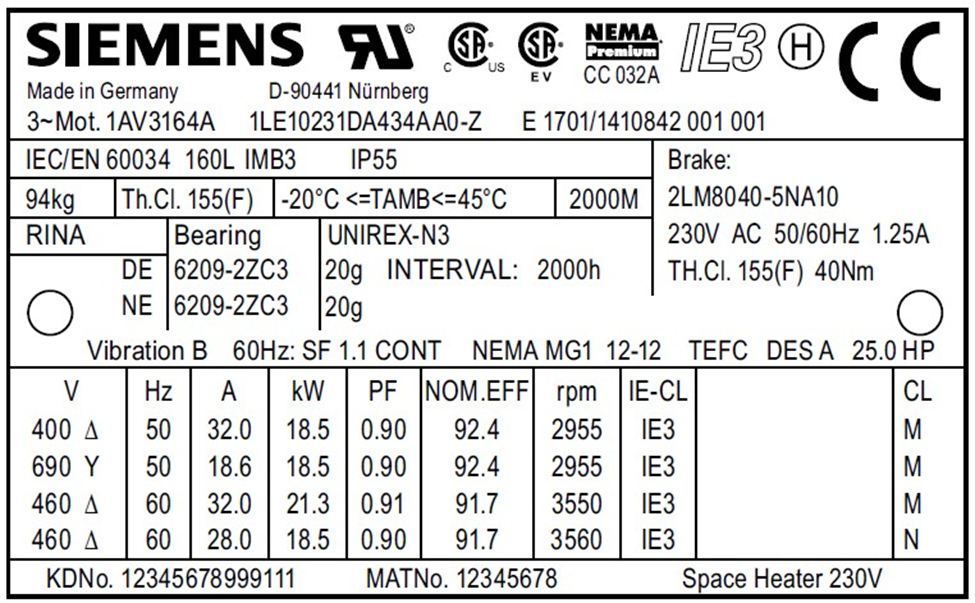
Extract fields from a nameplate photo

Snap the label and get Brand, MPN, Serial Number and key specs as structured fields. Our AI is trained on industrial nameplates—it understands the difference between a model number and a serial even on dirty or scratched labels.

  • Automatic Brand & MPN detection
  • Serial number extraction
  • Technical specs as attributes

Detected MPN

1LA6 186-0BB40

Brand

Siemens

One‑click background removal

Turn shop-floor photos into clean product images instantly. No more messy backgrounds or distracting warehouse clutter. Your listings look professional from the start, and you save hours on photo editing.

Photos are automatically attached to your records—no more manual file matching.

Before

Before background removal

After (AI)

After background removal

Quick market check

Instantly verify the value of your inventory. AutomaSnap generates direct search links for eBay and Automanet based on the extracted MPN. Sanity-check demand and pricing before you spend time on the full listing process.

  • One-click search for eBay & Automanet
  • Real-time price verification
  • Better pricing decisions
Market check illustration

ERP-ready spreadsheets

Export your entire batch as a clean spreadsheet. We provide consistent columns that map directly to SAP, Odoo, or BaseLinker. Every row includes the extracted data and direct links to the item photos.

export-automasnap.xlsx

Ready for ERP import

Brand MPN Serial Photo Link
SICK WTB4S-3N1162 SN-7F2A-19C view_photo.jpg
Siemens 3RV2011-1KA10 SN-2B8D-91F view_photo.jpg
Festo DSNU-25-100-PPV-A SN-9C4E-0A2 view_photo.jpg

FAQ

The questions teams ask before rolling this into intake.

What do I need to start using AutomaSnap?

All you need is a standard smartphone with a camera. There's no need to install or configure anything – the app works directly in your web browser. Just open the link and you can start scanning parts immediately.

How quickly can I get started?

Just sign up and you can start using the app right away. You can also run a quick pilot: scan 20 real parts, export the spreadsheet, and compare the time and error rate against your current process.

What if the label is dirty, scratched, or at an angle?

You can take another shot and quickly correct fields before saving. The flow is designed for shop-floor photos, not perfect scans.

Do I need to change my tools or rebuild my process?

No. The fastest path is export → ERP. Map columns once and keep your existing workflow.

What do we get at the end?

A clean item list (spreadsheet) with consistent fields and photo proof per item—ready to import into ERP and audit later.

Turn your next intake batch into clean ERP-ready rows.

Book a quick walkthrough or open the app. In one session you’ll see the real outputs (spreadsheets + photo proof) and the time saved on your parts.