On this page
How AI Identifies Products from Photos
AI simplifies product identification from photos by extracting structured data like brand names, part numbers, and serial numbers. This process replaces manual data entry, saving time and reducing errors. Here’s how it works:
- Image Preprocessing: Adjusts photos for clarity and focus.
- Object Detection: Identifies shapes, labels, and markings.
- Text Extraction: Uses OCR to read labels and engravings.
- Database Matching: Cross-references extracted data with product databases.
- Data Output: Generates ready-to-use spreadsheets for inventory systems.
This technology is especially useful for industries handling large inventories or damaged labels. Tools like AutomaSnap streamline workflows, cutting processing time significantly and improving accuracy. Businesses can integrate these outputs directly into ERP systems, speeding up inventory tasks and reducing costs.
Using AI Image Recognition for Fast & Accurate Small Business Inventory
How AI Identifies Products from Photos: The Core Process
Turning a photo into actionable inventory data involves a series of advanced AI-driven steps. Each stage, from capturing the image to generating structured outputs, plays a role in creating an efficient inventory management system. Here’s how it all comes together.
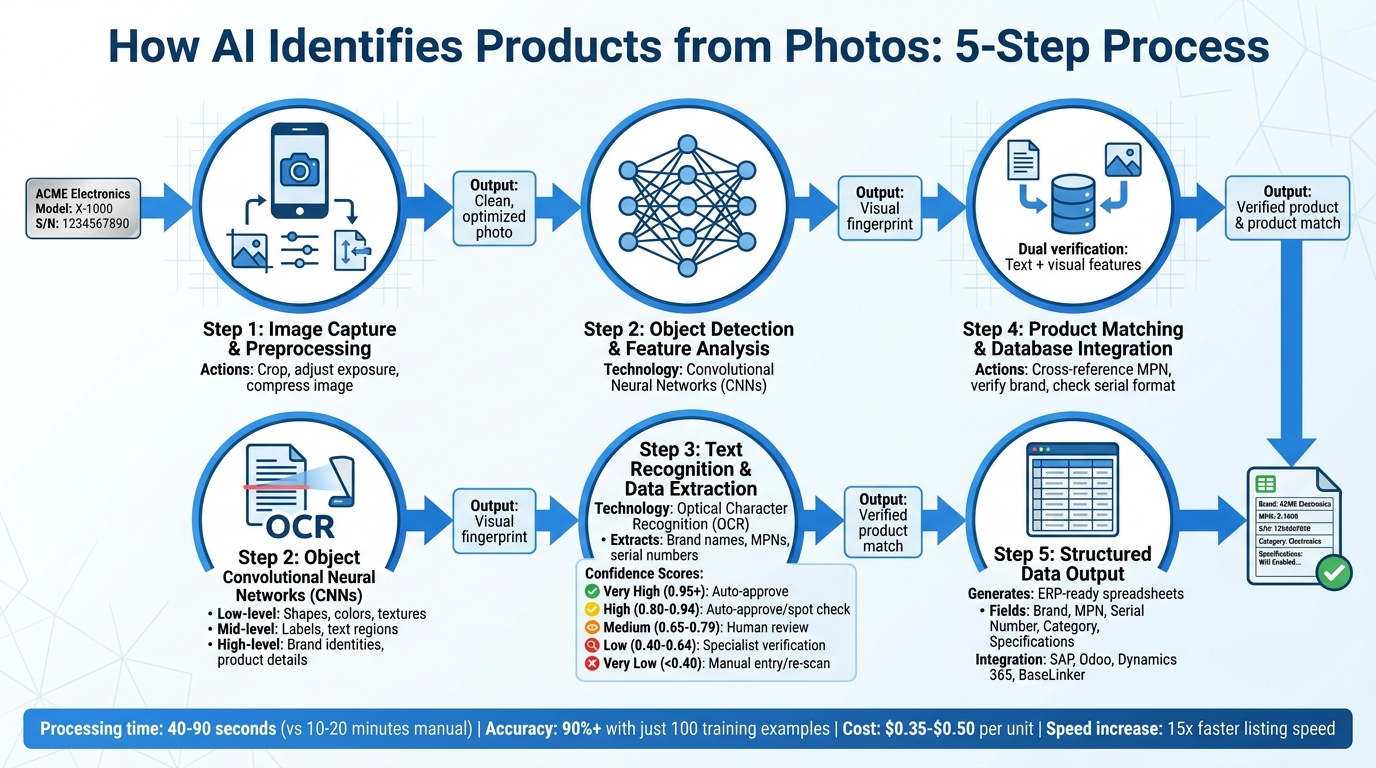
AI product identification relies on various technologies working in harmony: computer vision identifies objects and features, optical character recognition (OCR) extracts text from nameplates, and machine learning models match findings with product databases. These steps build on each other, refining accuracy and extracting essential details.
Modern systems use Convolutional Neural Networks (CNNs) to analyze images at multiple levels. CNNs first detect basic shapes and colors, then recognize labels and text, and finally identify specific brands and product details. Through transfer learning, pre-trained AI models can adapt to specific product categories with minimal additional data - achieving over 90% accuracy with just 100 specialized training examples.
This shift to camera-based inventory systems is transforming how businesses manage products, especially for items with damaged packaging, donated goods, or missing barcodes. The process combines device-based preprocessing with cloud-based AI analysis for a seamless workflow.
Let’s dive into each stage of this process.
Step 1: Capturing and Preprocessing the Image
The quality of the photo you take sets the foundation for the entire process. When you capture an image of a product nameplate, the AI system immediately begins preparing it for analysis. This preparation happens both on your device and in the cloud.
On your device, preprocessing adjustments include cropping to focus on the relevant area, tweaking exposure for better clarity, and compressing the image to speed up uploads without losing critical details. These steps ensure that even under less-than-ideal conditions, the system has a clean image to work with.
Step 2: Object Detection and Feature Analysis
Once the image is ready, Convolutional Neural Networks take over to analyze its content. The AI works through layers of detail:
- Low-level features: Shapes, colors, and textures
- Mid-level features: Labels, text regions, and markings
- High-level features: Brand identities and detailed product information
This process mimics how humans visually interpret objects but completes the task in seconds. Using visual embedding models, the AI converts the image into a unique numerical “fingerprint”, allowing it to compare the product against a database of known items - even if the exact product has never been photographed before.
Step 3: Text Recognition and Data Extraction
With Optical Character Recognition (OCR), the system reads text directly from nameplates, labels, or engraved markings. It extracts details like brand names, manufacturer part numbers (MPNs), and serial numbers.
To ensure accuracy, the system assigns confidence scores to the extracted text. These scores determine the next steps:
| Confidence Level | Score | Action Recommended |
|---|---|---|
| Very High | 0.95+ | Auto-approve for ERP integration |
| High | 0.80 - 0.94 | Auto-approve or spot check |
| Medium | 0.65 - 0.79 | Human review required |
| Low | 0.40 - 0.64 | Specialist verification needed |
| Very Low | <0.40 | Manual entry or re-scan required |
Clear, machine-printed labels often score above 0.95, while faded or damaged text might fall into the medium range, requiring human review before moving forward.
Step 4: Product Matching and Database Integration
After extracting text and visual features, the AI matches this information with product databases. It cross-references the MPN, verifies the brand name, and checks that the serial number format aligns with manufacturer standards.
This isn’t just about matching text. The AI also considers visual features. For instance, if the MPN matches but the product’s physical appearance doesn’t, the system flags it for review. This dual-verification process catches errors that text-only methods might miss.
For items not already in the database, the AI can create preliminary descriptions and suggest categories based on visual analysis and partial text matches. This is particularly helpful for resellers managing diverse inventories where not every item has been cataloged.
Step 5: Generating Structured Data Outputs
In the final step, the AI converts all verified data into a structured format, such as a spreadsheet, compatible with inventory management systems. The output includes fields like Brand, MPN, Serial Number, Product Category, and additional specifications identified during analysis.
These structured outputs integrate seamlessly with inventory platforms, eliminating the need for manual data entry. Consistent formatting ensures that searches, reporting, and analytics are more reliable - no more inconsistencies in brand names or MPN formats.
One example of this workflow in action is AutomaSnap. This system processes nameplate photos through all five steps, delivering clean, ready-to-use spreadsheets. It even handles background removal, assigns confidence scores for quality control, and offers quick market checks to verify pricing and demand for identified parts.
Common Challenges in AI Product Identification
Industrial environments often present tough conditions for capturing clear images, which makes extracting accurate inventory data a challenge. Without the right tools, these real-world obstacles can significantly impact data accuracy.
Handling Poor Image Quality and Damaged Labels
Nameplates in industrial settings are rarely in perfect condition. Errors from manual data transcription occur in 4% to 5% of cases, and poor data quality costs businesses an average of $15 million annually.
AI has advanced significantly in addressing these issues, especially through Vision-Language Models (VLM). These models do more than just recognize characters - they interpret the context within technical documents. For example, they can identify that text following “Model No.” likely represents a type name, even if some characters are obscured.
To tackle poor lighting conditions, AI uses photometric adjustments. Industrial environments often have harsh shadows or metallic glares that obscure text, but modern AI systems automatically correct these issues to make data readable. Even when text is entirely illegible, AI can rely on a product’s physical features - such as shape or color patterns - to create a “fingerprint” for identification.
A great example comes from TUEG Schillings GmbH, a German company that implemented AI-enhanced image processing in 2026. Their chemical plant operations faced challenges with nameplates damaged by vapors and corrosion. Using AI, they cut asset identification time by 50%. By resolving these image quality challenges, businesses can enhance data accuracy and speed up inventory processing.
But poor label quality isn’t the only problem - visual clutter in images can also hinder identification.
Automating Background Removal for Better Accuracy
Cluttered backgrounds, like busy warehouse shelves or workbenches filled with tools, can confuse AI systems trying to isolate relevant data. Automated background removal solves this issue using semantic segmentation, which allows AI to distinguish the product from its surroundings by analyzing pixel patterns.
Reflections from colored backgrounds can further complicate identification. For instance, metallic surfaces may pick up tints that lead to errors or low-quality digital records. To avoid this, photographing light-colored products against dark backgrounds and minimizing shadows is recommended. After removing the background, adding a subtle drop shadow can improve the appearance of digital catalogs. Clean background removal ensures better data extraction and higher-quality records.
Ensuring High Accuracy for Specialized Products
Even after addressing image quality and background issues, specialized products bring unique challenges. Items like spare parts, industrial equipment, and niche tools often come with complex alphanumeric codes, manufacturer-specific labels, and technical details that generic AI models struggle to interpret. Vision-Language Models are particularly effective here, as they understand field structures in context rather than treating every character string the same way. For example, they know that “SN:” usually precedes a serial number or that certain patterns indicate part numbers.
Unlike traditional OCR, VLMs combine contextual understanding with photometric adjustments to extract even the most complicated codes. This level of accuracy can lead to significant cost savings. Manual data entry for complex inventories can cost a business about $28,500 per employee annually, factoring in time and error correction. In contrast, solutions like AutomaSnap process specialized items for just $0.35 to $0.50 per unit, depending on volume. These improvements not only reduce costs but also ensure more reliable data for reseller platforms and inventory systems.
Practical Applications of AI Product Identification
AI-powered product identification is reshaping how businesses handle inventory, especially in operations managing large volumes of diverse items. By eliminating manual input and reducing errors, this technology is transforming workflows and boosting efficiency.
Streamlining Inventory Intake for Reseller Platforms
For platforms like eBay and spare parts distributors, manually processing inventory can be a time sink. On average, it takes about 10 minutes per item to photograph, extract details, and input data into spreadsheets - a process prone to delays and mistakes.
AI tools are changing this entirely. With just a single smartphone photo of a product’s nameplate, AI can automatically extract key details like brand, MPN, and serial number, remove the background, and generate structured data - all in seconds. For example, Gal-Industry, an industrial automation reseller, adopted AutomaSnap in early 2026 to replace their manual system. The results were striking: they saw a 15x increase in listing speed, cutting processing time from over 10 minutes per item to just seconds. This not only eliminated errors but also turned idle inventory into active listings almost immediately, driving sales faster than ever.
For businesses processing hundreds of items daily, the benefits are even more profound. AI ensures inventory is ready for sale the same day it arrives, avoiding weeks-long backlogs. This rapid turnaround integrates seamlessly with other systems, creating a smooth, efficient workflow.
Exporting ERP-Ready Spreadsheets and Market Insights
AI tools don’t stop at speeding up listings - they also integrate directly with ERP systems, enabling real-time insights and streamlined operations. Tools like AutomaSnap can enrich the record and generate spreadsheets formatted for immediate import into systems like SAP, Odoo, Dynamics 365, and BaseLinker, eliminating the need for tedious reformatting steps.
These tools also deliver real-time market intelligence. Once a product is identified, the system provides instant pricing snapshots based on its condition (New, Surplus, Refurbished, Used) and links to marketplaces like eBay to verify demand. This turns inventory intake into a strategic process. Resellers can quickly evaluate whether an item will sell, determine optimal pricing, and prioritize high-demand products while avoiding slow-moving stock - all for a cost of $0.35 to $0.50 per unit.
Best Practices for Using AI Product Identification Tools
Getting the most out of AI product identification tools isn’t just about having the right software - it’s about creating the right conditions for success. The quality of your images plays a huge role in how accurately data is extracted, and ensuring that the results integrate smoothly into your workflow can lead to major efficiency improvements.
Optimizing Image Quality and Angles
Clear, well-lit images are key to accurate AI performance. Make sure the product takes up most of the frame to capture as much visual detail as possible. Use multiple LED lights around the product to reduce glare and reflections, which can obscure important features like text or barcodes.
Your camera settings matter too. Keep the product in sharp focus by avoiding very large apertures (low f-stop numbers), which can blur parts of the label. A fast shutter speed prevents motion blur, and using a low ISO setting minimizes image noise that could interfere with AI recognition. Also, steer clear of wide-angle or fish-eye lenses, as they can distort the product’s shape depending on its placement in the frame.
“The old computing idiom of ‘garbage in, garbage out’ definitely applies to vision AI. Taking the time to set up the imaging station so that it produces consistent high-quality images will solve 95% of the problems.” - Neurala VIA
For environments like shop floors, LED lighting ensures consistent color regardless of the time of day or season, preventing variability that might confuse AI systems. Even tools like AutomaSnap, which work with smartphone cameras, can benefit from simple adjustments like using a desk lamp positioned at an angle to improve accuracy.
Once you’ve secured quality images, the next step is integrating the AI-generated outputs into your workflow seamlessly.
Integrating AI Outputs with Existing Systems
AI extraction truly shines when it fits neatly into your existing processes. Start by mapping extracted fields to your ERP system. For example, link “Brand” to “Item Category”, “MPN” to “Item”, and “Serial Number” to “Lot/Batch tracking.”
Check if your ERP or e-commerce platform supports API integration for real-time syncing. If not, you can use CSV or Excel imports for batch updates. Modern platforms like SAP, Odoo, Dynamics 365, and BaseLinker usually offer both options. For older systems, middleware solutions like Power Automate or Workato can help bridge the gap. This integration ties the data extraction process back into your operational systems, creating a smooth data flow.
Start small with a pilot export of 10-20 records to confirm that the field mappings work as intended. Set up validation rules to automatically flag low-confidence extractions for manual review, ensuring errors don’t slip into your system. To protect sensitive inventory data, use token-based authentication and SOC-2 compliant frameworks during data transfers.
Reviewing and Validating AI Results
Not all AI-generated data requires the same level of oversight. Confidence scores assigned by most AI tools can help you decide which outputs need closer review. These scores indicate how certain the system is about the accuracy of the extracted information.
| Confidence Level | Score | Meaning | Action |
|---|---|---|---|
| Very High | 0.95+ | Machine-printed, clearly visible | Auto-approve |
| High | 0.80-0.94 | Clear with minor shadows/fading | Auto-approve or spot-check |
| Medium | 0.65-0.79 | Requires interpretation (light damage) | Quick human review |
| Low | 0.40-0.64 | Significant clarity issues or blur | Route to specialist |
| Very Low | <0.40 | Barely legible or heavily damaged | Manual entry or re-scan |
For high-value items, it’s a good idea to spot-check even high-confidence extractions during the initial rollout. This practice not only helps you get a sense of the AI’s strengths and weaknesses but also builds trust in the system over time.
Conclusion
AI-driven product identification is revolutionizing inventory management. Tasks that once consumed 10-20 minutes can now be completed in just 40-90 seconds, turning backlogs into active listings almost instantly. For businesses managing spare parts, asset recovery, or e-commerce operations, this shift not only frees up tied-up capital but also slashes the costs of manual data entry, which averages $28,500 per employee annually.
This technology works by combining several advanced processes: image preprocessing, object detection, text recognition, and database matching. Together, these components extract essential details like brand names, MPNs, and serial numbers directly from photos. When integrated with ERP systems and validated through confidence scores, AI tools deliver market-ready data, eliminating intake delays.
The results are hard to ignore. Businesses using these systems report up to 15x faster listing speeds, a 75% reduction in processing times, and a significant drop in manual data entry costs.
The industry is steadily moving toward a camera-first approach to inventory, with smartphone cameras replacing barcode scanners for items without standard labels. These systems leverage human feedback to improve accuracy by 15-25% within six months, adapting to specific business needs over time. For companies looking to modernize, tools like AutomaSnap provide an accessible starting point, offering a free trial and volume pricing at around $0.55 per part.
The time to embrace these efficiency and cost-saving opportunities is now.
FAQs
What kind of photos work best for AI to read nameplates?
To ensure AI can accurately read nameplates, use photos that are clear, well-lit, and focused. Make sure the label’s details - like text, barcodes, and serial numbers - are fully visible, even if the label is worn or scratched. Good lighting and sharp focus are key for better accuracy.
How does AI tell a real match from a look-alike part?
AI pinpoints a genuine match by examining characteristics like shape, size, markings, and distinct details such as serial numbers or MPNs (Manufacturer Part Numbers). Through advanced computer vision and OCR (Optical Character Recognition), it pulls key information from labels or nameplates and cross-references it with official records. This blend of visual inspection and data comparison ensures precise identification, even when labels are worn or dirty, minimizing mistakes caused by similar-looking parts.
When should I trust the confidence score vs. re-scan?
When the confidence score indicates high accuracy - say, close to 99% - you can rely on it. However, if the score is low, or the image appears unclear, damaged, or of poor quality, it’s best to perform a re-scan to ensure proper identification.
Try it yourself
Scan your first nameplate free — no card required
Open the scanner in your browser, photograph a label and watch Brand, MPN, Designation Code and Serial come back as an ERP-ready row. No install, no credit card.