On this page
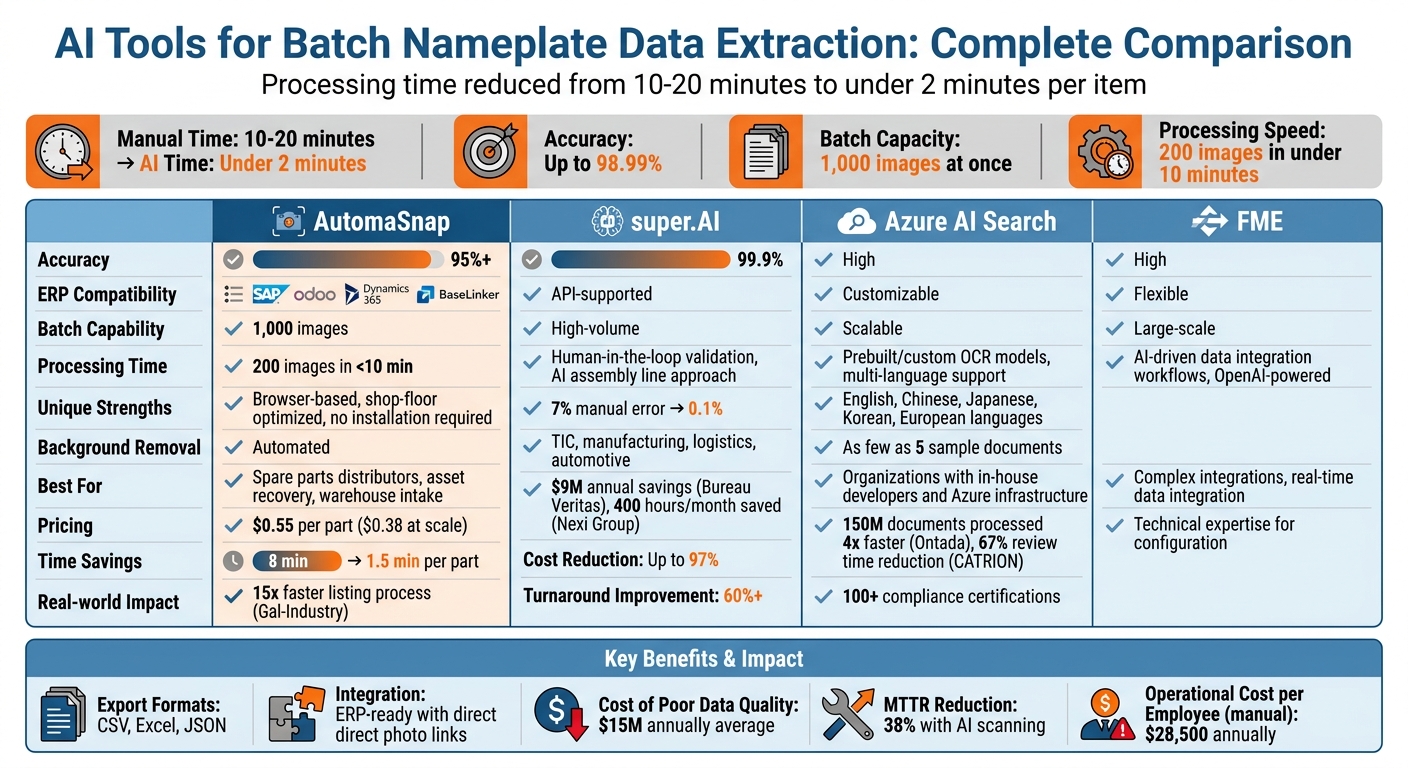
Extracting data from nameplates is time-consuming and error-prone. Workers spend 10-20 minutes per item, with mistakes costing businesses millions annually. AI tools now streamline this process, cutting time to seconds and improving accuracy to over 95%. These tools handle dirty or damaged images, export ERP-ready data, and even enrich information with pricing insights.
Key Highlights:
- Manual effort reduced: From 10-20 minutes to under 2 minutes per item.
- High accuracy: Up to 98.99% for data extraction.
- Batch processing: Handle 1,000 images at once; 200 images in under 10 minutes.
- ERP integration: Export in formats like CSV, Excel, or JSON for systems like SAP and Dynamics 365.
- Additional features: Background removal, market pricing insights, and e-commerce-ready outputs.
AutomaSnap, super.AI, Azure AI Search, and FME are leading tools, each offering unique strengths. AutomaSnap stands out for shop-floor usability, while super.AI excels in accuracy with human oversight. Azure AI Search is ideal for developers, and FME suits complex integrations.
Quick Comparison Table:
| Tool | Accuracy | ERP Compatibility | Batch Capability | Unique Strengths |
|---|---|---|---|---|
| AutomaSnap | 95%+ | SAP, Odoo, etc. | 1,000 images | Browser-based, shop-floor optimized |
| super.AI | 99.9% | API-supported | High-volume | Human-in-the-loop for error-free results |
| Azure AI | High | Customizable | Scalable | Prebuilt/custom OCR models |
| FME | High | Flexible | Large-scale | AI-driven data integration workflows |
AI tools for batch nameplate data extraction save time, reduce errors, and integrate seamlessly with enterprise systems, making them essential for industries like manufacturing, e-commerce, and logistics.
Super.AI Customer Stories: Automating Nameplate Extraction with Bureau Veritas
AutomaSnap Features for Batch Nameplate Processing
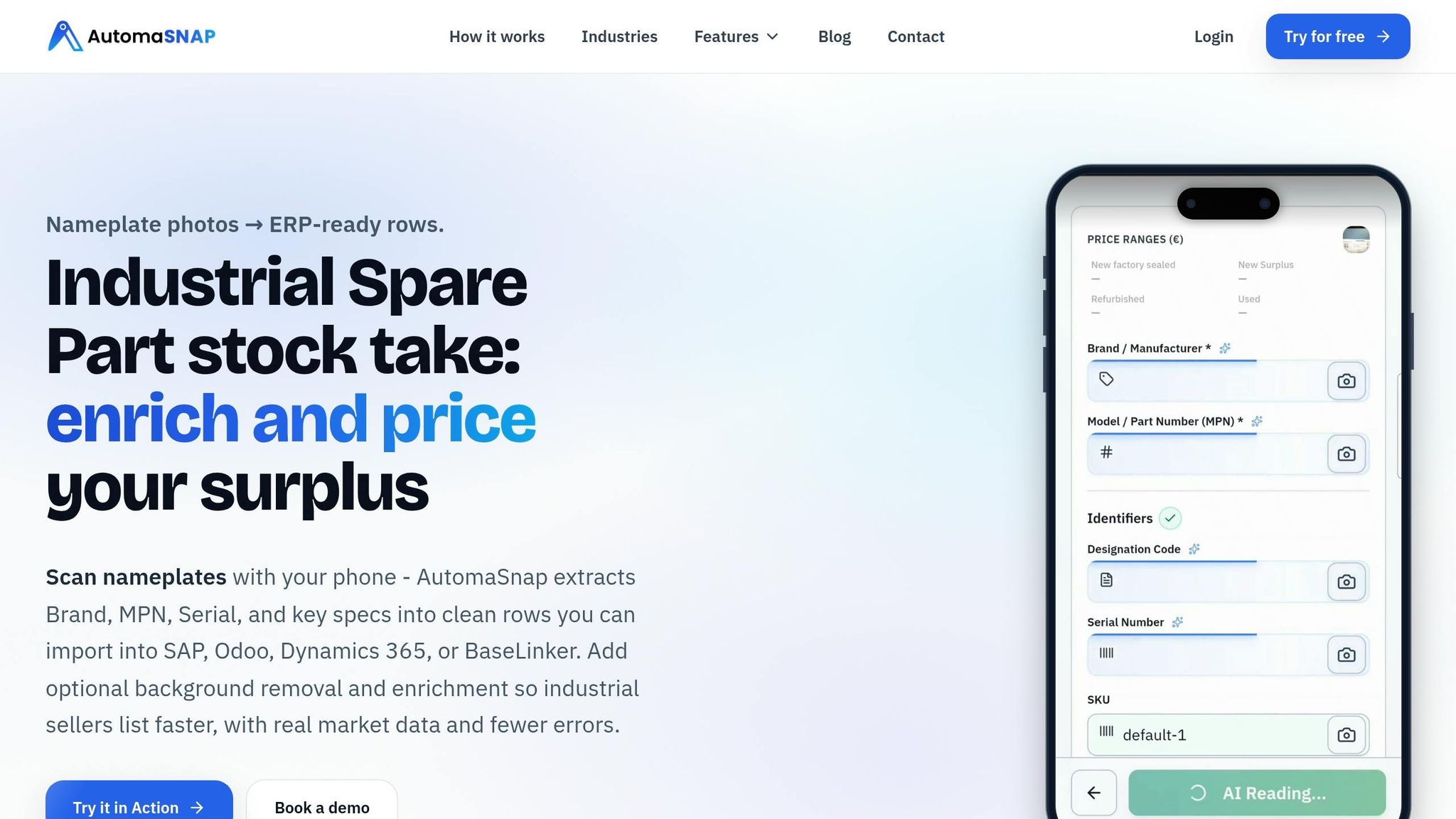
AutomaSnap simplifies nameplate data collection with a smartphone and AI-powered tools. Workers can capture nameplates directly on the shop floor using a mobile browser - no need for extra hardware or software. Each photo is converted into a data row, and multiple images can be exported as a single spreadsheet.
This system slashes manual processing time from 8 minutes per part to just 1.5 minutes. For Gal-Industry, an industrial automation reseller, this efficiency boost resulted in a 15x faster listing process and eliminated data entry errors entirely.
“AutomaSnap modernized how we work. Nameplate data flows into our system instantly and accurately, listings are created with professional photos and rich SEO descriptions, and the time we used to spend on manual tasks is now invested in growing the business”.
By automating tedious, error-prone tasks, AutomaSnap delivers both speed and accuracy, solving key challenges in the industrial sector.
Data Extraction and Background Removal
Using computer vision and OCR technology, AutomaSnap extracts details like Brand, MPN, and Serial Number from even the most challenging photos. It handles scratched, worn, or poorly taken images with 95% accuracy, processing batches of up to 1,000 images at a time. For instance, it can process 200 images in under 10 minutes.
The platform also includes AI-powered segmentation to remove cluttered backgrounds, creating transparent PNGs or clean white-background visuals. These polished images are perfect for catalogs and e-commerce listings. This feature has been especially useful for eBay sellers, who reported a 30% increase in click-through rates when using cleaned-up product images. Batch processing of over 500 photos is fully automated, requiring no manual effort.
ERP-Ready Spreadsheet Exports
AutomaSnap ensures data is export-ready for ERP systems by organizing outputs in formats like CSV, Excel (.xlsx), and JSON with US-localized formatting (e.g., 1,234.56). It maps columns to ERP fields for systems like SAP or Odoo, and each data row includes a direct link to the original photo, providing a reliable visual audit trail.
Customizable templates allow quick imports, reducing integration time from hours to minutes. For Dynamics 365 users, data flows seamlessly through OData connections, while BaseLinker users can upload formatted spreadsheets without extra steps.
Market Checks for Pricing and Demand
AutomaSnap also offers real-time market insights to streamline pricing decisions. By integrating APIs from eBay and Automanet, it provides instant access to metrics like average price ranges (e.g., $450-$550 for similar items), sell-through rates (e.g., 85% in 30 days), and demand scores categorized as High, Medium, or Low. These insights are appended directly to exported spreadsheets, making pricing decisions faster and more precise.
This feature resolves a common bottleneck in asset recovery workflows. As noted by Gal-Industry:
“Without fast, accurate visibility into a product’s market value, teams hesitated to invest time in photographing and listing items. Slow onboarding directly reduced turnover and tied up working capital”.
AutomaSnap eliminates the 10-20 minutes typically spent on manual price research, providing condition-based price ranges and accelerating the entire process.
Other AI Tools for Batch Nameplate Data Extraction
Several AI platforms provide specialized solutions for batch nameplate data extraction, catering to different organizational needs and technical setups. Let’s explore a few noteworthy options.
super.AI: Document Processing for Nameplates
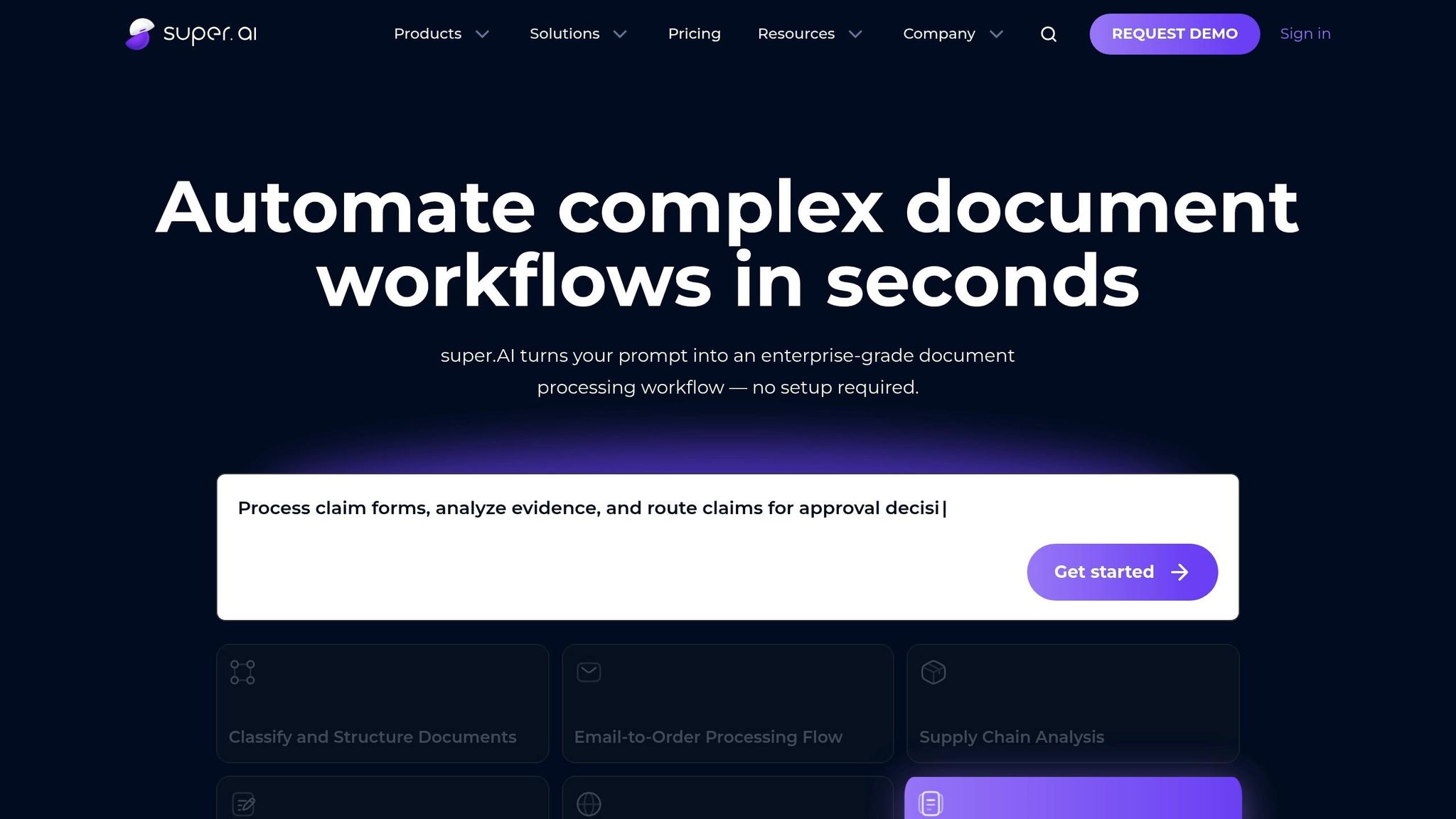
super.AI employs an “AI assembly line” approach, combining bots, AI, and human oversight to process nameplate images. This platform can extract critical details such as manufacturer, model number, serial number, voltage, frequency, power requirements, and compliance certifications from photos.
By incorporating human-in-the-loop validation, super.AI achieves an impressive 99.9% accuracy rate, significantly reducing the 7% manual error rate commonly associated with traditional methods. For example, in November 2021, Lano, a global payroll and compliance platform, eliminated manual data entry using super.AI. Hagen Gall, Head of Merchant Onboarding and Operations Technology, shared:
“With super.AI it was really reading 99.9% of all the information in the document and allowed us to get rid of this manual process”.
super.AI has driven substantial savings for its clients. Bureau Veritas, a leader in testing and inspection, saved $9 million annually by implementing this platform for high-accuracy data extraction. Nexi Group automated its paper-based documentation processes, saving 400 hours monthly. Meanwhile, a global TIC company processed over 100,000 data points annually, with an estimated economic impact of $5 million.
The platform supports both no-code solutions (Super.Extract) and API integration for programmatic batch processing. It reports operational cost reductions of up to 97% and turnaround time improvements exceeding 60%. Industries such as testing, inspection, certification (TIC), manufacturing, logistics, and automotive are particularly well-suited for super.AI’s capabilities.
Azure AI Search for OCR-Based Batch Processing
Azure AI Search, integrated with Document Intelligence, uses OCR pipelines to extract text and metadata from nameplate images stored in Azure Blob Storage. This platform supports multiple languages, including English, Chinese, Japanese, Korean, and various European languages.
Azure provides prebuilt models for common document types, requiring no training, as well as custom models that can be trained with as few as five sample documents. This adaptability makes it a strong choice for handling non-standard nameplate formats. For instance, CATRION automated invoice validation using Azure Vision, reducing review time by 67%.
The platform supports large-scale operations through REST interfaces, container deployment, and edge or on-premises configurations. In 2022, Ontada processed 150 million unstructured documents four times faster using Azure AI services. Similarly, Beth Israel Lahey Health developed a copilot agent with nearly 100% document access accuracy for patient services.
Azure operates on a pay-as-you-go pricing model, with free and standard options based on transaction volume. Backed by over 100 compliance certifications and supported by 34,000 engineers focused on security, Azure is ideal for organizations with in-house developers and existing Azure infrastructure.
FME with AI Integration for Data Extraction
FME (Feature Manipulation Engine) integrates OpenAI-powered workflows to extract and organize data from nameplate images, emphasizing batch processing efficiency. As a data integration tool, FME connects various sources and formats, making it ideal for organizations needing to link nameplate data with other enterprise systems.
The platform automates custom pipelines that combine AI-driven text extraction with data transformation, validation, and routing to systems like asset management databases, maintenance records, or inventory systems. This capability is particularly valuable for real-time data integration.
While FME requires technical expertise for configuration, it offers significant flexibility for organizations with complex integration needs. With proper setup and computing resources, FME supports large-scale batch processing through scheduled workflows, making it a versatile option for streamlining nameplate data extraction at scale.
Each of these tools brings its own strengths to the table, addressing the challenges of nameplate data processing in unique ways. From high-accuracy extraction to seamless integration with enterprise systems, these platforms offer tailored solutions for diverse operational needs.
Tool Comparison for Batch Nameplate Data Extraction
Feature Comparison Table
Let’s break down how AutomaSnap excels in batch nameplate data extraction. This platform is built to meet the demands of industrial environments, offering features tailored for shop-floor applications.
Here’s a quick overview of its key capabilities:
| Tool | Extraction Accuracy | ERP Compatibility | Background Removal | Browser-Based Access | Dirty/Damaged Labels | Best For |
|---|---|---|---|---|---|---|
| AutomaSnap | High (AI-trained on industrial nameplates) | SAP, Odoo, Dynamics 365, BaseLinker, eBay | Automated | No installation required | Optimized for shop-floor conditions | Spare parts distributors, asset recovery, warehouse intake |
AutomaSnap achieves high accuracy - up to 95% - thanks to AI models specifically trained on industrial nameplates. It processes batches efficiently, handling up to 1,000 images at a time and completing 200 images in under 10 minutes. Even scratched, worn, or poorly photographed nameplates are no match for its capabilities.
The platform integrates seamlessly with ERP systems like SAP, Odoo, and Dynamics 365. It supports export-ready formats such as CSV, Excel, and JSON, all formatted for U.S. standards (e.g., 1,234.56). Each row of data includes a direct link to the original photo, making visual verification simple and effective.
With browser-based access, AutomaSnap removes the need for installations. Warehouse staff can use smartphone cameras to capture nameplate images, requiring no specialized training. This accessibility tackles operational inefficiencies, which can cost companies $28,500 per employee annually due to manual processing errors averaging 4-5%.
These features make AutomaSnap a practical solution for efficient, accurate, and ERP-ready nameplate data processing in demanding industrial settings.
Conclusion: Selecting an AI Tool for Batch Nameplate Data Extraction
Choosing the right AI tool for batch nameplate data extraction means matching its features to your specific operational needs. The technology has come a long way, moving beyond older OCR systems that struggled with issues like dirt and poor lighting. Today’s advanced Vision-Language Models (VLM) are designed to handle these challenges, offering contextual understanding and reliable performance, even in demanding shop-floor conditions.
This shift matters because manual data entry is both expensive and prone to errors.
AutomaSnap addresses these challenges effectively. Starting at $0.55 per part (and dropping to $0.38 at scale), it dramatically reduces processing times from 10-20 minutes to under 90 seconds. Its advanced AI models excel at extracting accurate data, even from scratched or poorly photographed nameplates, ensuring critical inventory details are captured without hassle.
For larger operations, features like batch processing and ERP integration are key. AutomaSnap simplifies this by exporting ERP-ready data in standard formats, making it easy to verify and upload directly from a browser.
Testing the system on a small batch can help you gauge its ROI. With poor data quality costing businesses an average of $15 million annually and AI-driven nameplate scanning cutting Mean Time to Repair (MTTR) by 38%, the efficiency gains and error reduction often justify the investment.
FAQs
What photo quality do I need for accurate nameplate extraction?
For the best results in nameplate extraction, always use high-quality photos. Ensure the images are clear, well-lit, and properly focused. While AI tools can handle some challenges, like interpreting details on dirty or scratched labels, starting with optimal images significantly improves accuracy. Avoid using blurry or dimly lit photos, as they can compromise the extraction process.
How do I map extracted fields into my ERP import template?
AutomaSnap makes it easier to align extracted fields with your ERP template by creating spreadsheets that are already formatted to match your system’s column requirements. Once data like Brand, MPN, and Serial Number is extracted from nameplate photos, you can review and make any necessary edits. After that, simply download the spreadsheet and import it into your ERP system. This process helps ensure accurate field mapping and minimizes the risk of manual entry mistakes.
How can I estimate ROI for batch nameplate scanning?
To figure out ROI, start by comparing the expenses tied to manual data entry - like labor hours, mistakes, and delays - with the benefits of automation. AI tools can slash manual work by as much as 80%, which not only trims costs but also boosts data accuracy. Key metrics to focus on include time saved per batch, the number of batches processed, and the resulting cost savings. These figures can help showcase the financial advantages and highlight the long-term boost in productivity.