
On this page
Here’s why integrating OCR with ERP systems is a game-changer:
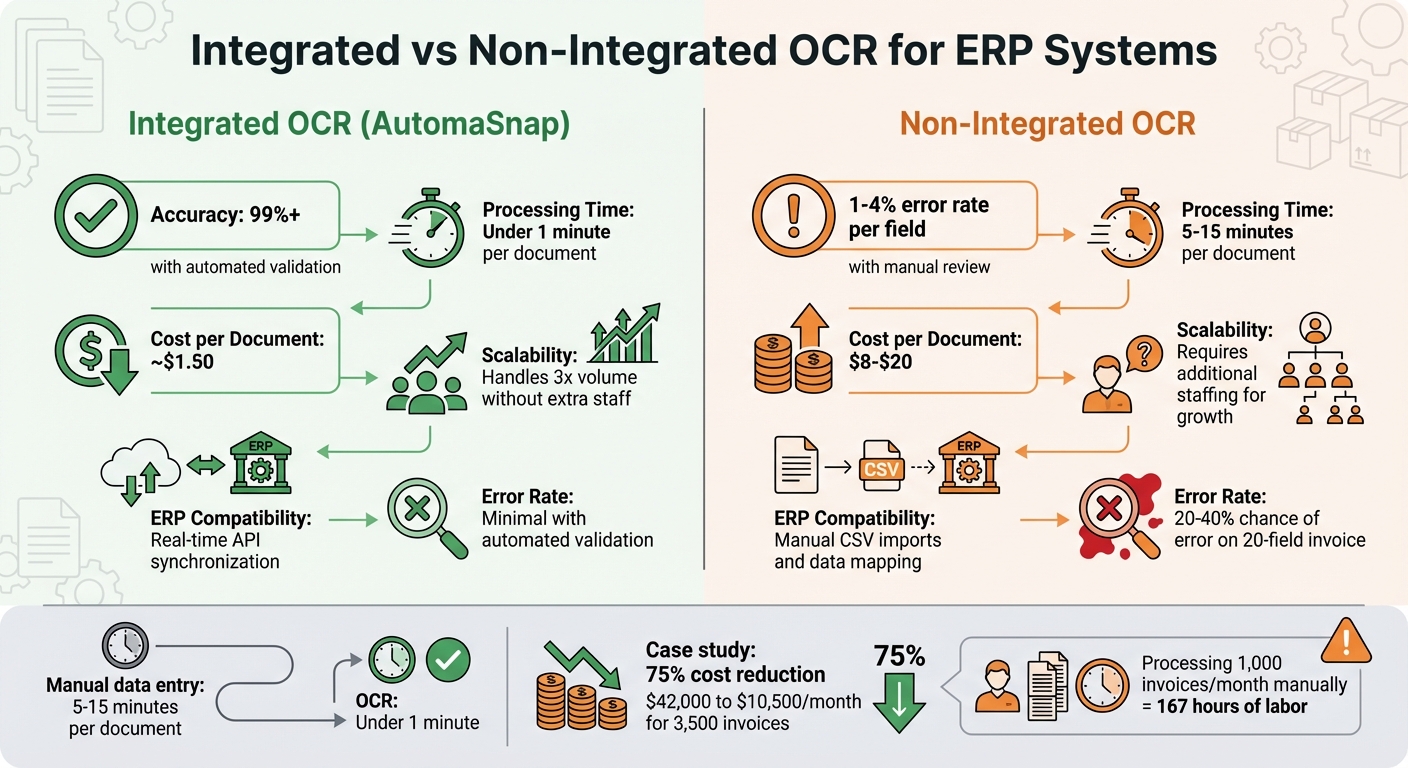
- Saves time: Manual data entry takes 5-15 minutes per document. OCR cuts this to under a minute.
- Reduces errors: OCR ensures 99%+ accuracy compared to the 1-4% error rate of manual input.
- Cuts costs: Processing invoices manually costs $8-$20 each. OCR reduces this to about $1.50 per document.
- Scales effortlessly: Handles growing inventory without adding staff or creating backlogs.
For example, a distributor using Dynamics 365 tripled its document volume over 18 months without hiring more employees. Another company saved $31,500 monthly by integrating OCR with SAP.
Quick Comparison
| Feature | Integrated OCR (e.g., AutomaSnap) | Non-Integrated OCR |
|---|---|---|
| Accuracy | 99%+ | 1-4% error rate per field |
| Scalability | Handles growth without extra staff | Requires more staffing |
| Cost per Document | ~$1.50 | $8-$20 |
| ERP Compatibility | Real-time sync | Manual data mapping required |
Integrated OCR eliminates inefficiencies, ensuring faster, more accurate, and cost-effective inventory management. It’s especially useful for businesses processing hundreds or thousands of documents monthly.
1. AutomaSnap OCR Integration
AutomaSnap combines AI-powered OCR technology with ERP workflows to streamline inventory management. It extracts key details like Brand, MPN, and Serial Number from nameplate photos and converts them into structured spreadsheets. These spreadsheets are ready to integrate with ERP systems such as SAP, Odoo, Dynamics 365, and BaseLinker. By automating data entry, the platform minimizes manual input and reduces errors to just 1% to 4% per field.
Data Accuracy
The platform employs advanced AI vision models that interpret document context without relying on rigid templates. Each field is assigned a confidence score, with data exceeding 95% confidence automatically posted. Fields with lower confidence are flagged for quick human review, ensuring data quality and avoiding the “Garbage In, Garbage Out” problem. Accuracy rates remain consistently above 99%. For example, in June 2025, a B2B loyalty and incentive agency in Australia and New Zealand integrated AI OCR into their Odoo ERP system. This reduced document processing time from 3-5 minutes to under 30 seconds per document while maintaining over 99% accuracy. These benefits scale effortlessly as inventory demands grow.
Scalability for Large Inventories
AutomaSnap’s infrastructure supports operations ranging from a few dozen to thousands of items daily, all without additional staffing. A fast-growing distributor using Microsoft Dynamics 365 tripled its revenue and document volume over 18 months. By integrating AI OCR, they managed three times the invoice volume with the same team size and eliminated a two-week backlog within 30 days. The platform’s asynchronous processing ensures near-instant data syncing, enabling warehouse teams to scan nameplates directly on the shop floor using just a smartphone camera and a web browser.
Cost Efficiency
Cost savings are another standout feature of this integration. AutomaSnap offers flexible pricing plans: $39/month for 1,000 tokens (Basic Plan), $99/month for 3,000 tokens (Growth Plan), and $199/month for 6,500 tokens (Enterprise Plan). For example, a global manufacturer processing 3,500 supplier invoices monthly cut costs from $42,000 to $10,500 per month - saving 75% - after implementing AI OCR with SAP S/4HANA in 2025.
ERP Compatibility
AutomaSnap delivers export-ready spreadsheets that align perfectly with ERP fields. Supported formats include JSON, XML, and CSV, ensuring smooth data integration. The platform also provides photo proofs, enabling three-way matching between scanned data, Purchase Orders, and Goods Received Notes. This automated reconciliation helps maintain real-time inventory accuracy without disrupting existing workflows.
2. Non-Integrated OCR Solutions
Non-integrated OCR systems come with a hefty manual workload. These tools extract text but lack direct connectivity to ERP systems, requiring manual data transfers. While this setup might suffice for smaller operations, it quickly becomes unmanageable as volume increases.
Data Accuracy
Errors are a major concern with non-integrated systems. With a 1%-4% error rate per field, a 20-field invoice could carry a 20%-40% chance of error. Manual processes are especially prone to this error rate since they lack the automated validations found in integrated systems. Without real-time checks against your ERP’s vendor master or purchase orders, inaccuracies can go unnoticed. A stark example of this is Target Canada, where data for 75,000 products was manually entered into SAP, resulting in only 30% accuracy compared to 98%-99% in U.S. operations. This contributed to a $2.1 billion loss and eventual market withdrawal. Jorge Martinez emphasizes that unchecked manual entry can quickly degrade data quality, highlighting the importance of automated validation.
Scalability for Large Inventories
Manual processes in non-integrated workflows struggle to scale. For example, processing 1,000 invoices per month requires around 167 hours of labor. Doubling that volume means doubling your staffing needs. Each document takes 5-15 minutes to process when manually verified against purchase orders, creating significant bottlenecks. As inventory grows, the need for additional labor makes this approach inefficient and unsustainable.
Cost Efficiency
The costs of non-integrated OCR systems go far beyond software fees. Manual processing costs range from $8.50 to $21.50 per invoice when factoring in labor, delays, and error corrections. Hiring a full-time data entry specialist adds an annual expense of $35,000-$45,000, while OCR software itself costs just $50-$150 per month. Without integration, these labor costs persist as teams reconcile OCR outputs with ERP inputs. Additionally, the manual mapping of data further slows operations, negating the time savings OCR is supposed to provide.
ERP Compatibility
Non-integrated tools create isolated data silos, leaving information disconnected from your ERP system. Extracted fields must be manually mapped to match the ERP’s structure, then uploaded via CSV or XML files. This reintroduces the very manual effort OCR aims to eliminate. As NOI Technologies explains:
“The real value of OCR emerges when the data flows directly into the ERP system, where it can be validated, matched, and processed automatically, eliminating manual errors”.
Without direct integration, businesses miss out on automated three-way matching between invoices, purchase orders, and receipts. These inefficiencies underline the trade-offs of non-integrated systems, which will be explored further in the next section.
Pros and Cons
When it comes to managing large-scale inventories, integrated OCR solutions have a clear edge over non-integrated options in areas like data accuracy, scalability, cost, and ERP compatibility. Here’s a breakdown of how the two compare:
| Comparison Point | AutomaSnap (Integrated OCR) | Non-Integrated OCR Solutions |
|---|---|---|
| Data Accuracy | 99%+ accuracy using AI vision models | 1-4% error rate per field |
| Scalability | Handles three times the volume without extra staffing | Requires hiring to match growth |
| Cost Efficiency | Around $1.50 per document | Around $8.00 per document |
| ERP Compatibility | Real-time API synchronization for instant updates | Manual CSV imports and data mapping needed |
| Processing Speed | Processes documents in under a minute | Takes 5-20 minutes per document |
Integrated OCR doesn’t just automate tasks - it transforms operations. For example, a distribution company using Dynamics 365 integration saw its revenue triple over 18 months (ending in late 2025). They managed three times the invoice and purchase order volume without hiring additional staff, and they eliminated a two-week backlog in just 30 days. This level of efficiency brings not only time savings but also significant cost reductions.
Take another case: a global manufacturer that processes 3,500 supplier invoices monthly across 15 locations. By integrating OCR with SAP S/4HANA, they slashed their monthly processing costs from $42,000 to $10,500 - a 75% reduction - and cut turnaround time from 12 days to just 1.5 days. While non-integrated tools might seem cheaper upfront (with software fees ranging from $50 to $150 per month), the hidden labor costs for manual verification can quickly outweigh those savings.
Another major advantage of integrated OCR is its seamless connection with ERP systems. With real-time integration, data flows directly into platforms like SAP, NetSuite, or Microsoft Dynamics. This allows for instant validation against vendor records and general ledger codes, ensuring accuracy and speed. On the other hand, non-integrated solutions often require manual mapping, which reintroduces the very inefficiencies that OCR is designed to eliminate.
Conclusion
Integrated OCR-ERP solutions streamline operations by eliminating manual delays and reducing errors. With real-time data synchronization, businesses can avoid costly discrepancies before data even enters their systems. Automated three-way matching - comparing purchase orders, receiving documents, and invoices - ensures accuracy every step of the way. Companies utilizing integrated OCR within their ERP systems can experience up to 90% faster processing times and achieve over 99% accuracy. This boost in efficiency provides a strong edge in competitive markets.
Deciding between integrated and non-integrated OCR solutions largely depends on the size of your operations and your growth goals. For businesses handling hundreds or thousands of documents each month, integrated solutions like AutomaSnap deliver better long-term value. These systems create ERP-ready spreadsheets, removing the need for manual mapping and ensuring immediate inventory visibility. On the other hand, smaller operations with a lower document volume might initially lean toward non-integrated OCR due to lower subscription costs, ranging from $50 to $150 per month. However, hidden labor expenses for manual verification and data transfer can quickly negate these savings.
One of the standout benefits of integrated OCR is its ability to scale with your business. It handles high document volumes without requiring additional staff, unlike non-integrated options, which often cause bottlenecks during data imports. Integrated systems not only clear backlogs quickly - such as resolving two-week delays in just 30 days - but also ensure your team can manage growing operations without additional strain.
Starting with high-volume documents, like invoices and shipping receipts, is an excellent way to see immediate returns on investment. Over time, integration can expand to include areas like returns management and serial tracking. By reducing processing costs, speeding up workflows, and creating a centralized, accurate data source, integrated OCR solutions enable businesses to scale inventory operations with ease and efficiency. This investment ultimately transforms inventory management into a smoother, more reliable process.
FAQs
What documents should I automate first to get the fastest ROI?
Automating high-volume, repetitive documents - such as invoices and purchase orders - is a smart starting point. These types of documents are perfect for achieving a quick return on investment. Why? Automation can slash processing times by up to 90% and boost accuracy to an impressive 99%. By focusing on these first, you can free up substantial time and resources while significantly improving operational efficiency.
How does OCR-ERP integration prevent bad data from entering the ERP?
OCR-ERP integration helps maintain data quality by automating the extraction and validation process. It identifies errors or missing information before the data is entered, which cuts down on human mistakes and boosts accuracy. This means the ERP system receives clean, trustworthy data, making operations smoother and reducing the risk of expensive errors.
What does it take to connect OCR outputs to my ERP fields and workflows?
Integrating AI-driven OCR tools with ERP systems can simplify and automate data extraction and entry processes. Here’s how it works:
- Set Up Data Recognition Rules: Configure the OCR tool to identify and extract the required information from scanned documents or images.
- Map Data to ERP Fields: Align the extracted data with the corresponding fields in your ERP system to ensure seamless integration.
- Automate Data Transfer: Use APIs or integration modules to automate the flow of data between the OCR tool and the ERP system.
To maintain accuracy and efficiency, it’s essential to regularly fine-tune these configurations. This is especially useful for managing large-scale inventory operations, where precise data alignment can save time and reduce errors.