On this page
How AI Extracts Nameplate Data
AI simplifies the extraction of nameplate data, turning a once time-consuming and error-prone manual process into a fast, reliable, and automated one. Nameplates on industrial equipment hold critical information like brand, part numbers, serial numbers, and technical specifications. This data is essential for tasks like inventory management, maintenance, and resale.
Here’s how AI improves the process:
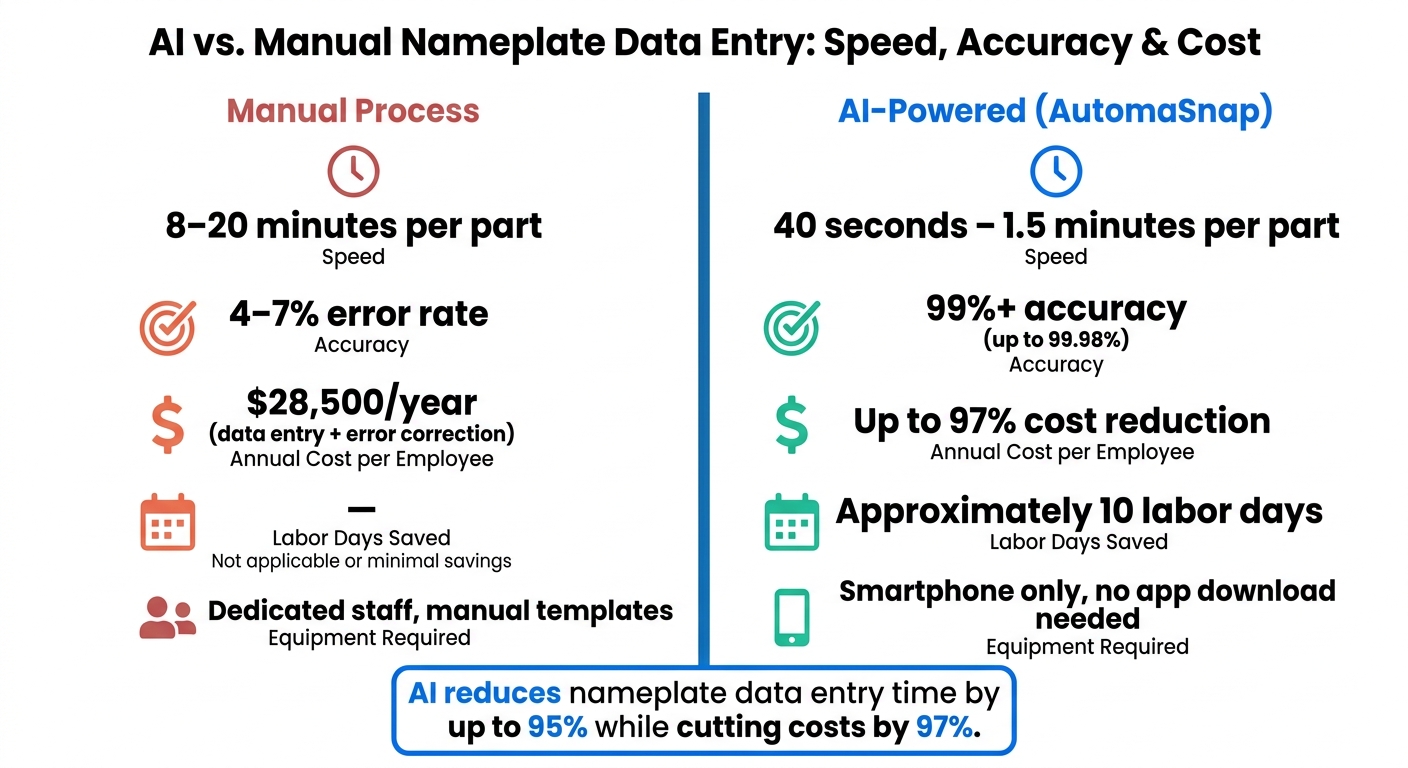
- Speed: Manual data entry takes 8-20 minutes per part, while AI tools like AutomaSnap process the same in 40 seconds to 1.5 minutes.
- Accuracy: Traditional methods have a 4-5% error rate, but AI achieves over 99% accuracy by understanding the context of text (e.g., identifying “Model No.” as a part number).
- Ease of Use: AI tools work directly on smartphones, requiring no special equipment. A simple photo of the nameplate is enough to extract and structure data for ERP systems.
- Cost Savings: Companies spend $28,500 per employee annually on manual data entry and error correction. AI drastically reduces these costs by automating the process.
Getting Ready for AI-Powered Nameplate Extraction
How to Take Good Nameplate Photos
Getting accurate AI extraction starts before you even snap a photo - preparation is everything when it comes to capturing ERP-ready data.
The quality of your photo plays a huge role in how well the AI can extract information. The good news? You don’t need fancy equipment. A regular smartphone camera works perfectly fine, as long as you follow a few best practices.
First and foremost, focus on framing: the nameplate should take up most of the frame. Make sure to shoot directly in front of the nameplate, avoiding angles or tilts that could distort the text. A sharp, clear image with legible text is essential before you submit it.
Lighting is another big factor. Metallic nameplates often reflect light, creating glare that can obscure characters. Adjust your phone’s position to minimize glare and ensure the text stays visible. If you’re in a high-vibration area, like near running machinery, steady your phone against a solid object to avoid blurry shots.
Even though Vision-Language Models (VLMs) can handle some challenges, like faded or shadowed text, starting with a clean, clear image is your best bet. It reduces the likelihood of needing manual reviews later on, saving time and effort.
Once you’ve captured a good photo, it’s important to know the specific data formats required for the AI to map each field correctly.
Data Formats and Requirements to Know
AI nameplate extraction doesn’t just stop at reading text - it interprets the data too. A VLM, for example, understands that the text following “Model No.” is the Manufacturer Part Number (MPN) and that anything under “Serial” is a unique identifier. This contextual ability is what sets advanced AI apart from basic OCR, which lacks any sense of field structure.
Instead of just gathering labels, the AI organizes fields like Brand, MPN, Serial Number, and specs (e.g., voltage, power output, RPM) into structured formats that are ready to populate ERP or inventory systems. This eliminates the need for additional formatting, making the data immediately useful.
If you’re scanning multiple parts, keep in mind that the system can batch-process photos. Each image automatically generates a new row in a single export file. This feature keeps your workflow smooth and spares you from the hassle of merging records manually.
Fitting AutomaSnap into Your Shop-Floor Workflow
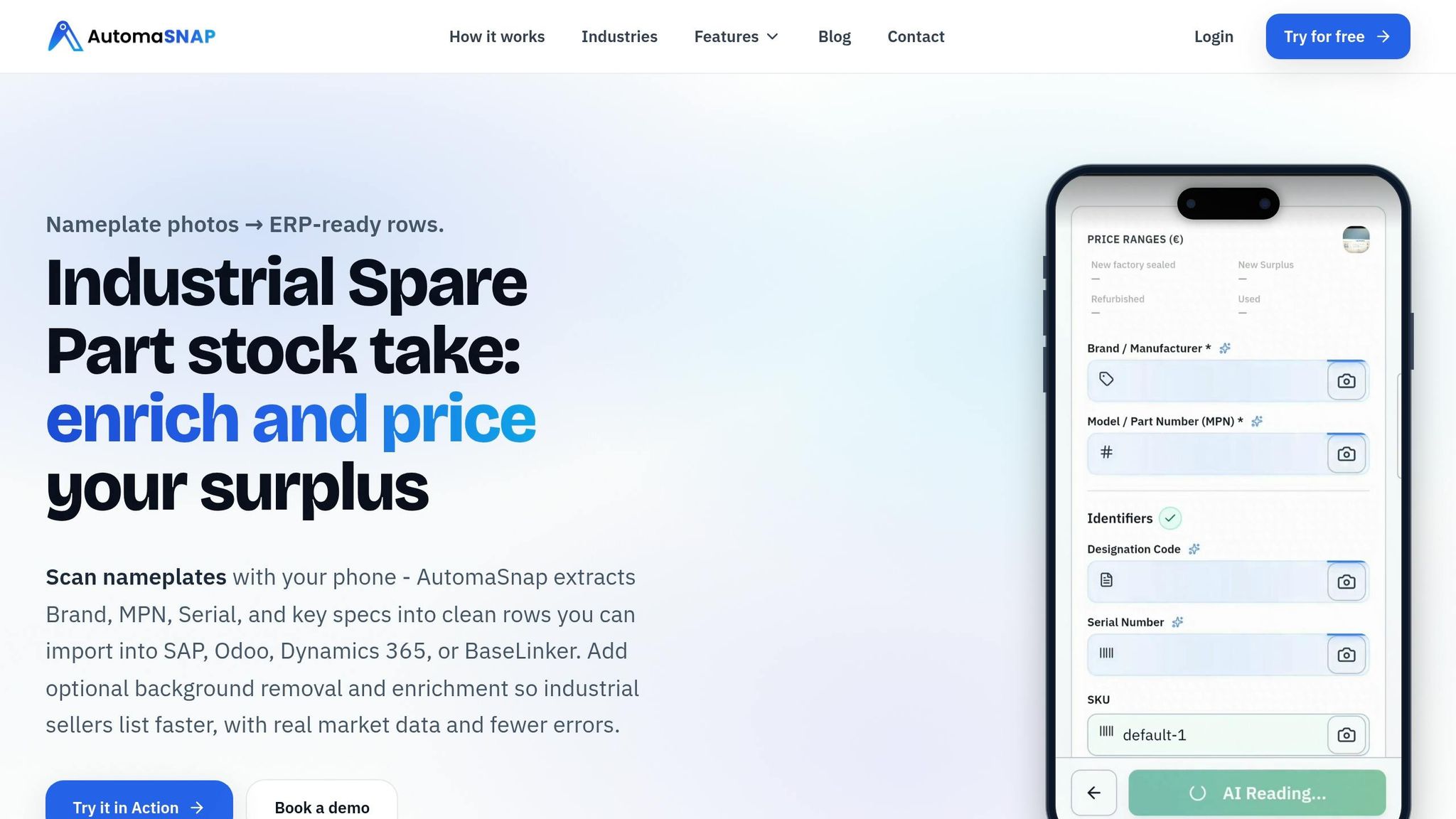
Once you’ve got clear photos and understand the data requirements, integrating AutomaSnap into your workflow is straightforward. It works directly in your smartphone’s web browser - no app downloads or special equipment needed. Any worker with a phone is already set up to use it.
The process is simple: Capture, Review, Export. Snap a photo, verify or adjust the extracted fields (like Brand, MPN, Serial Number, and specs), and then export the data to a spreadsheet or ERP system such as SAP, Odoo, or Dynamics 365. This streamlined sequence cuts down on manual errors and speeds up the process, taking just 40-90 seconds per part. Compare that to the 10-20 minutes it typically takes using manual methods.
If you’re unsure about committing, try running a small test. Scan about 20 parts and compare the time and error rate to your current process. Considering manual data entry costs companies an average of $28,500 per employee annually in time and error correction, even a quick trial can reveal the potential savings and efficiency gains.
Step-by-Step: How AI Extracts Data from Nameplates
Uploading and Preprocessing Images
Once a nameplate photo is captured, the first step is to clean it up. This involves correcting issues like glare, shadows, or uneven lighting. Modern Vision-Language Models (VLMs) handle these adjustments automatically, so even photos taken in tricky conditions - like under a flickering warehouse light or near reflective surfaces - can be enhanced. Tools like AutomaSnap also step in to remove distracting backgrounds, ensuring the image is ready for accurate analysis. After this, the system identifies and processes the text on the nameplate.
Text Detection and OCR
With the preprocessed image in hand, the AI scans it to pinpoint areas containing text. Using computer vision, the system identifies these text zones and focuses its recognition efforts there. Unlike older OCR methods, modern VLMs not only read characters but also grasp their context. For example, if the text “Model No.” appears, the system understands the string of characters following it is likely a part number. These advancements allow AI-driven systems to achieve over 90% accuracy when extracting text from preprocessed images.
Field Classification and Data Parsing
After identifying and reading the text, the AI organizes it into specific fields like Brand, MPN (Manufacturer Part Number), Serial Number, voltage, and power output. This step ensures the extracted data is structured correctly for seamless integration into ERP systems. Unlike older methods that required manual templates or predefined field mappings, current models adapt to different fonts, layouts, and even languages without extra setup. The final output is a structured record, formatted and ready to populate an ERP system directly, removing the need for additional formatting. Before exporting, the system validates the data to ensure accuracy.
Validation and Error Correction
To maintain reliability, the AI assigns a confidence score to each extracted field. These scores guide the next steps, as shown in the table below:
| Confidence Level | Score | Meaning | Recommended Action |
|---|---|---|---|
very_high | 0.95 | Machine-printed, clearly visible | Auto-approve |
high | 0.80 | Clear with minor shadows/fading | Auto-approve / Spot check |
medium | 0.65 | Requires interpretation (light damage) | Quick human review |
low | 0.40 | Significant clarity issues/blur | Route to specialist |
very_low | 0.25 | Barely legible/heavily damaged | Manual entry / Re-scan |
Fields with a confidence score of medium or lower are flagged for operator review instead of being auto-approved. If an operator corrects a flagged field, that adjustment feeds back into the system, helping it learn and improve accuracy for future extractions of similar nameplates. This feedback loop ensures the system gets better over time.
Exporting Data and Automating Inventory Intake
Exporting Data to ERP Systems
Once data is extracted and validated, the system prepares it for integration with ERP platforms. The AI automatically formats the data into CSV or XLSX files, ready for direct import into systems like SAP, Odoo, and Dynamics 365. These files are tailored to U.S. formatting standards - dates appear as MM/DD/YYYY, decimal points are used as separators, and dollar signs denote pricing. The best part? You only need to map the columns once. After that, the same mapping applies to every future export, saving time and eliminating the hassle of manual reformatting. This streamlined process ensures inventory data is consistently organized and ready for action.
Processing Single Photos and Batch Uploads
Whether you’re working with a single item or a large batch, the system adapts to your needs. For individual parts, all it takes is snapping a photo, verifying the details, and exporting the data. For larger jobs, you can capture multiple nameplates in sequence. Each photo is processed into a separate row within a single file. Thanks to concurrent processing, even a batch of 50 items won’t take 50 times as long to complete. Beyond just exporting data, the extracted information can also provide insights into market trends, helping you make quicker decisions.
Running Market Checks and Pricing Lookups
The extracted Brand and MPN (Manufacturer Part Number) data act as ready-made search keys for market research. With a single click, AutomaSnap connects you to industrial marketplaces, offering quick access to pricing and demand data. This automation eliminates the risk of errors caused by manual entry, such as typos during searches.
A case study from Gal-Industry highlights the importance of this speed and accuracy:
“Crucially, without fast, accurate visibility into a product’s market value, teams hesitated to invest time in photographing and listing items. Slow onboarding directly reduced turnover and tied up working capital.”
Improving AI Accuracy and Workflow Efficiency Over Time
Using Feedback Loops to Improve Data Quality
Refining AI accuracy is an ongoing process, and feedback loops play a key role in improving data quality. Through continuous human input, AI-powered extraction systems learn and adapt over time. For example, operators can review and correct fields such as Brand, MPN, and Serial Number within the app before exporting data. Each correction helps the system better recognize similar patterns in future cases, seamlessly integrating into the AutomaSnap workflow.
This is especially helpful when dealing with worn or damaged labels. Advanced Visual Language Models (VLMs) go beyond simply reading characters - they interpret context. For instance, even if a label is faded or slightly corroded, the system can infer that a string following “Model No.” is likely an MPN. This contextual understanding reduces the need for frequent corrections, particularly when processing nameplates from the same type of equipment repeatedly.
Metrics to Track AI Extraction Performance
Tracking performance metrics is essential for optimizing workflows and improving efficiency. The most impactful metrics include:
- Correction rate: Measures how often operators need to edit fields before exporting data.
- Listing velocity: Tracks how quickly parts move from intake to active listings.
- Processing time per item: Evaluates how much time is saved using AI-assisted workflows.
These metrics directly reflect how well the system reduces manual labor and speeds up operations. For context, manual transcription of complex alphanumeric strings in challenging factory environments typically has a 4-5% error rate, and poor data quality can cost businesses an average of $15 million annually. Gal-Industry’s results highlight the significant improvements AI-driven extraction can deliver.
To further streamline operations, focus on records flagged by confidence score thresholds (as discussed in the Validation and Error Correction section). This ensures your team spends time only on records that genuinely need review.
Workflow Tips for U.S.-Based Industries
For industries like spare parts distribution and asset recovery, storing extracted data as a permanent, reusable record can significantly improve efficiency. Instead of scanning a part for a one-time export, aim to create a unified data registry. This allows fields like Brand, MPN, and Serial Number to serve as canonical records, reusable across ERP, CRM, and e-commerce platforms without needing to rescan.
For eBay sellers and e-commerce operations, the time savings are striking. While manual intake takes about 8 minutes per part, AI-assisted workflows reduce that to roughly 1.5 minutes. Since AutomaSnap runs directly in a smartphone browser, there’s no need for specialized hardware or app installations - just a phone and a photo. At scale, this efficiency adds up quickly, cutting down manual effort and speeding up inventory turnover within the streamlined AutomaSnap workflow.
Super.AI Customer Stories: Automating Nameplate Extraction with Bureau Veritas

Conclusion: AI-Driven Nameplate Extraction in Practice
Handling nameplate data manually can take 10-20 minutes per part and comes with an error rate of up to 7%. In contrast, AI-driven extraction slashes that time to just 40 seconds-1.5 minutes while achieving an impressive 99.98% accuracy rate.
The advantages go far beyond faster extraction. By integrating this process into your workflow, you can significantly reduce the need for manual retyping and reformatting. For example, batch processing allows you to capture multiple sequential photos and generate a single ERP-ready spreadsheet. This approach can cut operational costs by as much as 97% and save roughly 10 labor days annually. The process fits seamlessly into shop-floor operations, making inventory digitization more efficient than ever.
These improvements don’t just save money - they also pave the way for quicker market integration. With AutomaSnap, you can use a smartphone browser to generate ERP-ready outputs, complete with photo proof for every record. This ensures traceability and eliminates common bottlenecks during inventory intake.
To see the impact firsthand, try running a pilot with 20 parts. Compare the time and error rates to your current process - it’s the first step toward speeding up inventory intake.
FAQs
What photo issues cause the most extraction errors?
Poor image quality and nameplate damage are the biggest culprits behind extraction errors. This includes things like blurry photos, scratched or dirty labels, angled shots, or labels that are partially obscured or worn out. AutomaSnap’s OCR is built to manage many of these challenges. And if there’s any uncertainty, you can easily correct fields manually - no need to retake the photo.
How does AI tell an MPN from a serial number?
AI leverages OCR (Optical Character Recognition) and its ability to interpret the layout of nameplates to differentiate between a model/part number (MPN) and a serial number. By being trained on actual nameplates - including those that are scratched or viewed at an angle - it can accurately determine which text belongs to each field. The result? It extracts and organizes this information into structured, editable formats ready for export.
How do I import exports into my ERP without remapping every time?
To keep things simple and avoid remapping, make sure to export from AutomaSnap using consistent columns like Brand, MPN, Serial Number, and specs. This ensures your ERP import template remains uniform.
You can choose between one-click exports or downloading files in formats like CSV, JSON, or XLSX. Once exported, map the columns in your ERP import settings. Test the process with a small batch to confirm the headers align correctly. After that, you can save and reuse the mapping for all future imports.