On this page
How AI Reads Faded Nameplates
AI has transformed how industries handle worn-out nameplates, solving challenges like glare, corrosion, and faded text. By 2026, Vision-Language Models (VLMs) outperform older OCR tools, achieving up to 99.5% accuracy in extracting data like serial numbers, voltages, and part details - even from damaged surfaces. This technology integrates seamlessly with ERP systems, reducing manual errors and cutting data entry costs by up to 97%.
Key Highlights:
- Why It Matters: Faded nameplates can cause costly errors in ordering parts or maintaining inventory.
- How It Works: AI preprocesses images, detects text regions, and reconstructs damaged characters using advanced modeling.
- Applications: Used by spare parts distributors, asset recovery teams, and industrial resellers to save time and eliminate errors.
- Preparation Tips: Clean nameplates, use proper lighting, and take stable, high-resolution photos for better results.
The process is fast, efficient, and reliable, turning smartphone photos into structured, ERP-ready data in seconds.
Preparing Nameplates for AI Processing
Identifying Common Nameplate Damage
Understanding the types of damage on a nameplate is essential for setting realistic expectations before taking photographs.
The most frequent issues fall into three categories: surface degradation (like rust, corrosion, and chemical pitting), marking degradation (such as worn dot-peen markings, shallow laser engravings, or faded ink), and geometric distortion (caused by curved or angled surfaces on pipes and shafts). Each of these can impact AI extraction differently. For example, rust might disrupt character continuity, making letters appear incomplete. Similarly, glare on stainless steel or chrome can create bright spots that obscure text, while curved surfaces can distort character shapes, turning a straight numeral like “1” into something unrecognizable.
| Damage Type | Effect on AI Extraction | Mitigation |
|---|---|---|
| Specular Glare | Washes out characters; creates bright hotspots | Use polarized or dome lighting |
| Corrosion/Rust | Breaks character continuity and reduces contrast | Use AI-OCR with contextual understanding |
| Curved Surfaces | Warps character geometry | Apply perspective correction algorithms |
Once you’ve identified any damage, the next step is cleaning and positioning the nameplate to maximize the chances of accurate AI processing.
Cleaning and Positioning Tips
Before taking photos, clean the nameplate to improve clarity. Use a dry or lightly dampened cloth to remove grease, dust, and debris. Avoid abrasive materials that could scratch or further damage any remaining markings. For corroded plates, a soft brush is typically the safest option.
Proper lighting is critical - lighting conditions influence about 70% of OCR success on metal surfaces. Fluorescent lighting, commonly found in U.S. shop floors, often causes glare. To counter this, adjust the light source or your position so that the light hits the plate at a low angle instead of directly overhead. This technique, known as darkfield illumination, allows light to skim across the surface, making shallow engravings and dot-peen marks more visible.
Taking Clear Nameplate Photos with a Smartphone
After cleaning and positioning, capturing a clear image is the final step. Stability is key - motion blur can significantly reduce OCR accuracy. Ensure the nameplate fills the frame and stays level to minimize the need for geometric corrections later.
To stabilize your smartphone, rest it against a fixed surface. Tap the screen to focus on the text area, and aim for a resolution of at least 300 DPI. Shooting at a slight angle can help reduce glare. Always review your photo immediately; if the AI produces a low-confidence score, retake the shot right away. Additionally, capturing a secondary photo of the entire asset can serve as a helpful reference for verification later.
How AI Reads and Processes Faded Nameplates
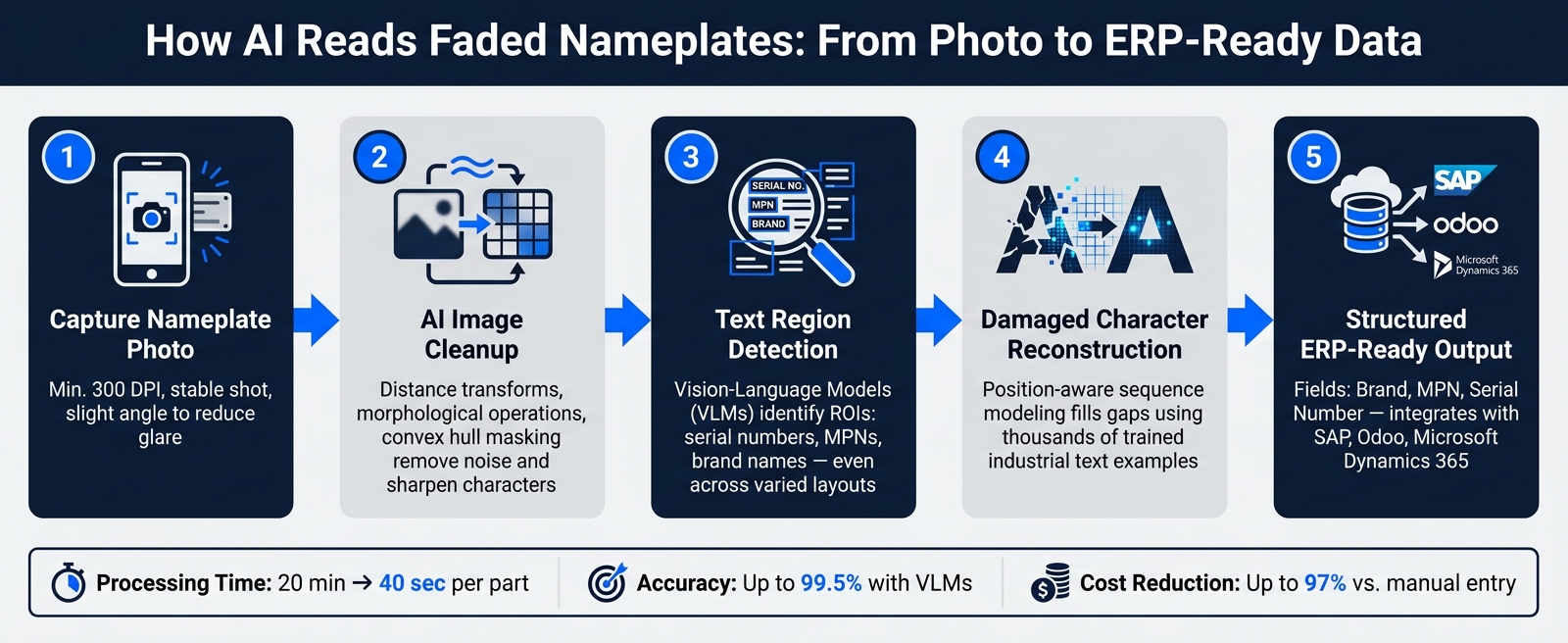
Building on preparation methods, AI now takes the lead in refining and reconstructing faded nameplates, ensuring accurate data extraction.
How AI Cleans Up Nameplate Images
Once the nameplate photo is captured, the AI doesn’t dive straight into the raw image. Instead, it preprocesses the image to eliminate everything that isn’t text.
Using distance transforms, the AI calculates how far each pixel is from the background. This helps uncover the true shapes of characters hidden under dirt or surface imperfections. Then, a combination of morphological operations - like “opening” (dilation followed by erosion) - and convex hull masking steps in. These techniques separate overlapping blobs, remove noise, and tightly outline the character shapes, making them ready for extraction.
The outcome? A sharper, cleaner image that allows the AI to extract text reliably, even from images of poor quality.
How AI Detects Text and Reads Layouts
After the image is cleaned up, the AI moves on to identifying text regions and understanding their context. This step is where advanced systems outshine older OCR methods.
Traditional OCR software simply looks for shapes that resemble letters. In contrast, Vision-Language Models (VLMs) - the gold standard in 2026 - analyze the entire structure of a nameplate. For example, the AI knows that a string following “Model No.” is likely a part identifier, not just a random collection of characters. With Region of Interest (ROI) detection, the system isolates specific text blocks - like serial numbers, brand names, or MPNs - even when they appear in varying layouts across different nameplate designs.
| Feature | Classic OCR | Vision-Language Models (VLM) |
|---|---|---|
| Resilience to Dirt | Very Low | Very High |
| Field Structure | Context-blind | Full contextual understanding |
| Lighting Needs | Requires specific setup | Photometric AI compensation |
| Language/Fonts | Requires manual mapping | Native (Zero-shot) recognition |
Once the text regions are pinpointed, the AI zeroes in on deciphering damaged or incomplete characters.
Reading and Rebuilding Faded or Damaged Characters
Decoding faded characters is no simple task. When characters are partially worn or missing, the AI doesn’t dismiss them. Instead, it uses position-aware sequence modeling to analyze the placement of incomplete characters within a string. By comparing these against thousands of trained examples of industrial text, the system makes educated guesses to fill in the gaps.
“AI-OCR models, trained on thousands of variations of metal text, can interpret incomplete characters and handle rotated or curved text.” - Intelgic
This capability is especially crucial in U.S. industrial settings, where imported equipment often features nameplates with mixed fonts, languages, and formats - like German motors, Japanese drives, or Italian pumps. VLMs adapt to these variations without requiring manual adjustments. Under ideal conditions, they reconstruct damaged characters with impressive accuracy, cutting down on manual errors significantly.
Adding AI Nameplate Data to Inventory Systems
AI has taken a significant step forward by transforming high-accuracy data extraction into actionable inventory records, converting images into structured data for seamless integration.
Turning Photos into Structured Data
After processing, AI doesn’t just extract raw text - it organizes it into structured fields like Brand, Manufacturer Part Number (MPN), and Serial Number. This structured format integrates directly with ERP systems like SAP, Odoo, or Microsoft Dynamics 365.
Manual data entry, which often comes with a 4-5% error rate and high labor costs, highlights the importance of this automated approach. Even a single incorrect digit in an MPN can lead to pulling the wrong part entirely. Tools such as AutomaSnap simplify this process by generating structured records directly from nameplate photos, eliminating the need for manual retyping.
Checking and Validating Extracted Data
While AI is highly efficient, it is not flawless, especially when dealing with damaged nameplates. To address this, a confidence score is assigned to each extracted field, helping reviewers prioritize their focus.
| Confidence Level | Score | Action |
|---|---|---|
very_high | 0.95 | Auto-approve |
high | 0.80 | Auto-approve / Spot check |
medium | 0.65 | Brief human review |
low | 0.40 | Route to specialist |
very_low | 0.25 | Manual entry / Re-scan |
This Human-in-the-Loop (HITL) system ensures efficiency by letting AI handle the bulk of the workload while human reviewers step in only when necessary. Modern AI tools also use contextual understanding to reduce errors, such as recognizing that a value next to “kW” relates to power output, not a serial number.
This validation process connects the data extraction phase to real-time market insights, creating a seamless workflow.
Using Structured Data for Pricing and Demand Checks
Once validated, structured data opens the door to real-time market analysis and dynamic pricing. Extracted fields like MPN and Brand allow the system to query live marketplace data, providing insights into current pricing and demand trends - even before the item is fully onboarded into inventory.
Bartek, Operations Manager at Gal-Industry, shared his perspective:
“Crucially, without fast, accurate visibility into a product’s market value, teams hesitated to invest time in photographing and listing items. Slow onboarding directly reduced turnover and tied up working capital.”
Conclusion: What AI Nameplate Recognition Delivers
The advanced AI methods outlined above bring dramatic improvements in both speed and precision. Gone are the days of squinting under a flashlight to decipher faded nameplates or manually retyping worn-out characters. With AI, processing time per part drops from up to 20 minutes to just 40 seconds. Even better, the output is structured, ERP-ready data - no more reliance on handwritten notes that are prone to transcription mistakes. These advancements not only speed up workflows but also improve overall accuracy and reliability.
By 2026, Vision-Language Models (VLMs) have taken over from traditional OCR as the go-to solution for nameplate recognition. These models bring powerful capabilities like photometric AI adjustments for poor lighting or metallic glare, along with contextual understanding that can differentiate between a model number and a serial number - even on corroded or scratched surfaces. This automation significantly reduces the likelihood of human error.
The cost savings are equally impressive. Manual data entry costs businesses an average of $28,500 per employee each year when factoring in time spent and error correction. Automating nameplate recognition slashes those costs by up to 97%.
On top of that, scalable solutions like AutomaSnap make inventory management and regulatory compliance easier than ever. With just a smartphone, a single operator can process thousands of parts each month, generating structured records (Brand, MPN, Serial Number) that seamlessly integrate into systems like SAP, Odoo, or Microsoft Dynamics 365. These records also meet the digital inventory requirements set by regulations like the NIS2 Directive and CSRD. This combination of efficiency and compliance is a game-changer for modern operations.
FAQs
What kinds of nameplate damage can AI still read?
AutomaSnap is designed to handle nameplates even when they are not in perfect condition. Whether it is scratches, dirt, dust, dim lighting, or faded print, the tool can still process the information as long as crucial details - like the Brand, MPN, or Serial Number - are visible. For photos that are extremely blurry or unclear, you have the option to retake the image or manually adjust the extracted fields before exporting.
What is the best way to take a glare-free nameplate photo with a phone?
To reduce glare, position your phone so the nameplate text is sharp and free of reflections. Tilt or adjust the angle to minimize glare from metal surfaces. If the photo appears blurry, or if there is heavy dust or reflections, retake it for better clarity. This method is also effective for capturing data from worn or angled nameplates, making it easier to extract structured details like the Brand, MPN, and Serial Number for seamless export.
How does extracted nameplate data get into my ERP system?
When your nameplate photo is processed, the extracted details - like Brand, MPN, Serial Number, and specifications - are neatly arranged into columns that are ready for your ERP system. AutomaSnap generates an export file in formats such as CSV, JSON, or XML, with custom field mapping to make sure the data integrates seamlessly into your ERP. Plus, built-in validation checks catch duplicates or missing fields, so your records stay accurate and current - no manual entry needed.