On this page
Manual data entry for spare parts is slow and error-prone, especially when dealing with multilingual nameplates. Multi-language OCR solves this by automating text extraction from images, significantly reducing errors and processing times. Here’s how it works:
- What It Does: Extracts text from nameplates in multiple languages (e.g., English, Chinese, Arabic) and converts it into structured data for inventory systems.
- Why It Matters: Global supply chains require handling diverse scripts. OCR ensures accurate data capture, avoiding costly errors in ERP systems.
- Key Benefits:
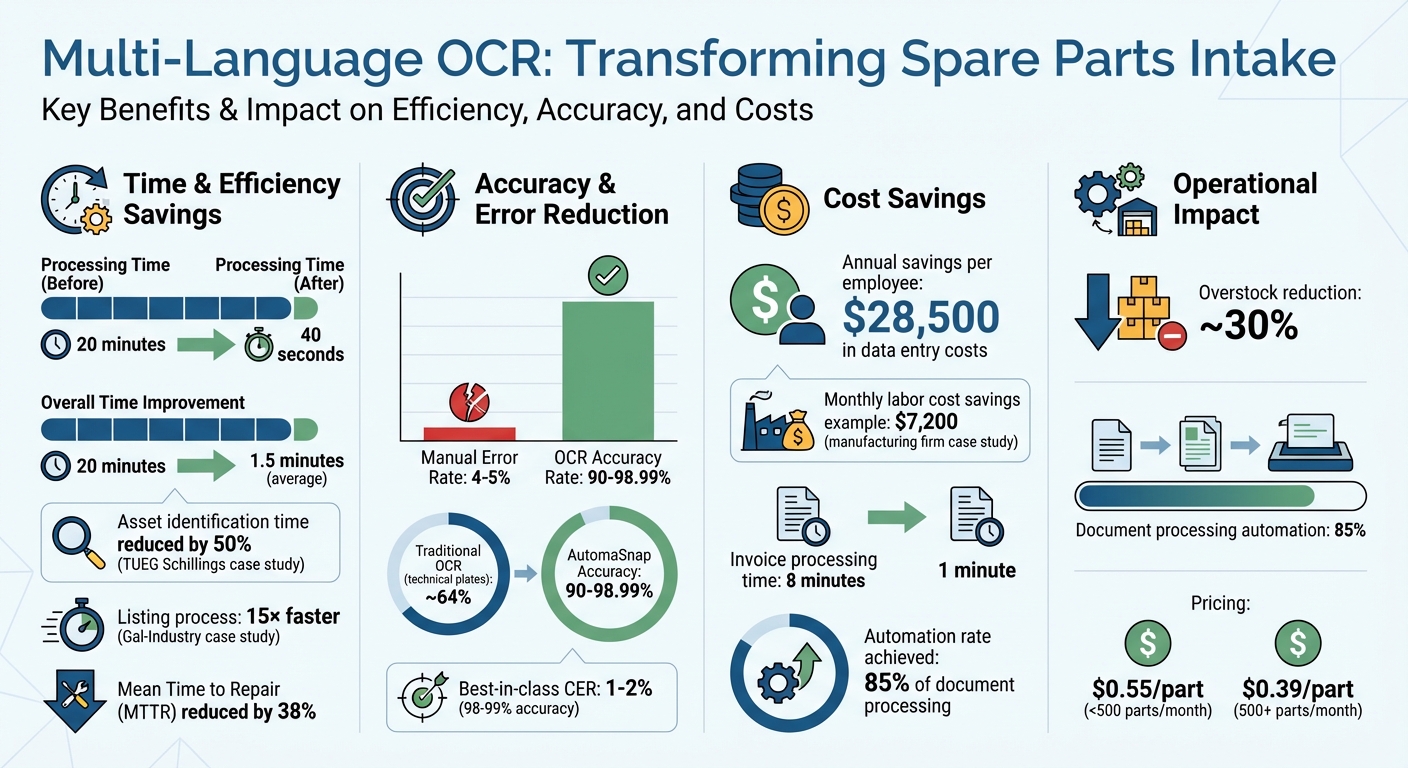
- Cuts processing time from 20 minutes to 40 seconds per part.
- Reduces manual errors (4–5% error rate in manual entry).
- Saves businesses up to $28,500 per employee annually in data entry costs.
- How It Works: Uses AI-powered Vision-Language Models to read text on challenging surfaces (e.g., metal, glass) and handle mixed scripts on a single label.
Webinar “Industrial OCR: Advanced OCR for Logistics and Industrial Applications”
Preparing Nameplate Images for OCR
Getting accurate, multi-language OCR for spare parts intake starts with properly prepared nameplate images. This step is essential to minimize errors during automated data extraction. In industrial settings - where dust, vibrations, and metallic glare are common - small adjustments in image preparation can make the difference between a clear scan and an unusable one. Well-prepared images allow AutomaSnap to extract critical details efficiently for ERP integration.
How to Capture Clear Nameplate Photos
Camera positioning plays a huge role in capturing clear images. Always hold your device perpendicular to the nameplate to avoid trapezoid distortion. Center the nameplate in the frame and ensure that each character is at least 20 pixels tall for better readability.
Lighting is another key factor. Use consistent natural or artificial light, and position the light source behind or beside you to avoid glare and reflections. In dim areas like factory corners, use your device’s flash for additional lighting. Keeping the camera steady is equally important - either hold your device as still as possible or rely on auto-capture features that snap the photo only when the image is stable.
“If the human eye is able to see the source image clearly, then it is possible to achieve good OCR results.” - Silvia Ardeleanu, Content Marketer, Doxis
Aim for a resolution of at least 1,000×1,000 pixels or a 300 DPI scan. Many mobile apps provide real-time guidance, such as prompts to “move closer” or warnings about excessive movement, to help you capture the best image from the start. If you still encounter issues, preprocessing can help correct imperfections.
Fixing Common Image Problems
Even good photos sometimes need adjustments to meet OCR standards. Image preprocessing techniques can boost OCR accuracy by 14–25 percentage points on lower-quality scans.
Binarization, which converts images into black and white using adaptive thresholding, helps standardize the text. Other techniques like deskewing, noise removal, and contrast enhancement (e.g., CLAHE) can fix tilts, remove unwanted artifacts, and improve text visibility.
For nameplates with low contrast, methods like CLAHE (Contrast Limited Adaptive Histogram Equalization) can make the text stand out more clearly from the background. Converting color images to grayscale can also reduce distractions and sharpen text edges.
Image Format and Resolution Requirements
Choosing the right image format is just as important. Use high-quality formats such as TIFF for archival purposes, PNG for single images, and PDF for multi-page scans.
Avoid low-quality JPGs, as their lossy compression can create artifacts around text, reducing OCR accuracy from 98% to 87%. Stick to a minimum resolution of 300 DPI for regular text, increasing to 600 DPI for very small fonts (6pt or smaller). For nameplate images, a resolution between 3,000–5,000 pixels is ideal.
| Format | OCR Quality | Best For |
|---|---|---|
| TIFF (uncompressed) | ⭐⭐⭐⭐⭐ | Archival, highest quality |
| PDF (image) | ⭐⭐⭐⭐⭐ | Multi-page documents |
| PNG | ⭐⭐⭐⭐ | Single images, lossless |
| JPG (high quality) | ⭐⭐⭐ | Already-compressed images |
| JPG (low quality) | ⭐⭐ | Avoid for OCR (artifacts) |
Using AutomaSnap for Multi-Language OCR
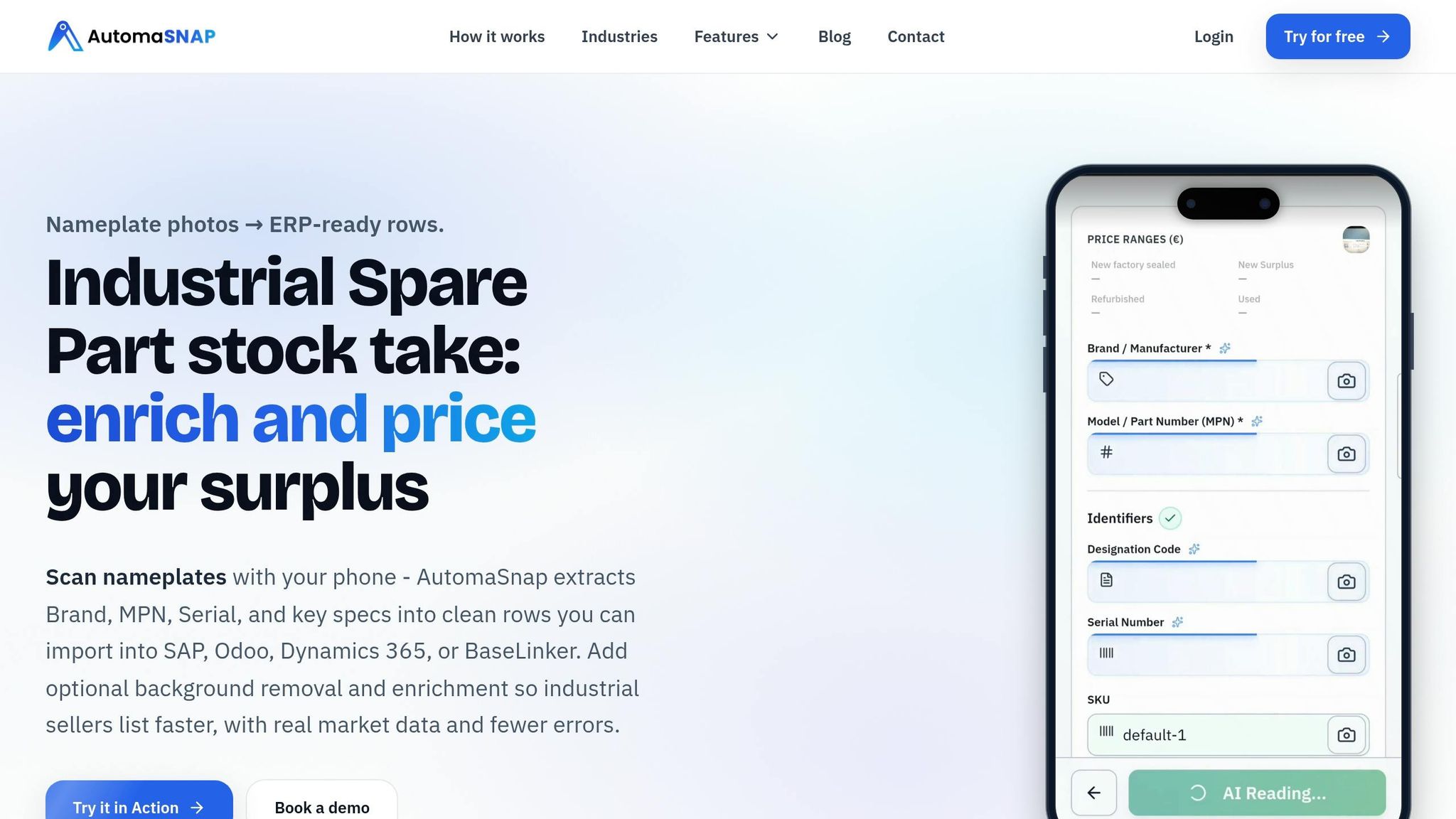
AutomaSnap simplifies the process of extracting text from nameplate images using a browser-based workflow. Powered by 2026-standard Vision-Language Models (VLM), the platform can interpret the technical structure of documents in multiple languages and layouts.
Uploading and Processing Images
You can upload images directly through your smartphone’s web browser - no need for app downloads or complicated setups. Just open the nameplate scanner in your browser, upload the nameplate photos, and let the processing begin. Built to handle shop-floor conditions, AutomaSnap works effectively even with dirty or scratched labels.
Pricing is volume-based: it’s about $0.55 per part for processing fewer than 500 parts monthly, dropping to $0.39 per part for 500 or more.
Once uploaded, the platform starts parsing critical data fields immediately.
Extracting Brand, MPN, and Serial Number
Unlike traditional OCR, which focuses solely on recognizing character shapes (often confusing “O” with “0”), AutomaSnap’s advanced models bring contextual understanding to the table. It accurately associates text with its intended field, such as linking “Model No.” to the type name or recognizing text under “Serial” as the unique factory ID.
“The system ‘understands’ the structure of a technical document: it knows that text following ‘Model No.’ is the type name, while the string under ‘Serial’ is the unique factory ID.” – Automa.Net
This intelligent approach achieves accuracy rates between 90% and 98.99%, a major leap compared to traditional OCR’s approximate 64% accuracy on complex technical plates. For example, in 2026, TUEG Schillings GmbH, a German SME serving the chemical industry, cut asset identification time in half - even when dealing with corroded nameplates in harsh environments - using AutomaSnap’s AI-driven image processing.
After extracting the data, the platform formats it for direct ERP system integration.
Creating ERP-Compatible Spreadsheets
AutomaSnap generates ERP-ready spreadsheets that seamlessly integrate with systems like SAP, Odoo, Dynamics 365, and BaseLinker. It automatically maps extracted fields to their corresponding ERP categories. For instance:
- MPN becomes the Material Code in SAP.
- Brand maps to the Product Category in Odoo.
- Serial Number converts to the Lot/Batch field in Dynamics 365.
In 2026, Gal-Industry, an industrial reseller, replaced its manual intake processes with AutomaSnap (case study). This change made their listing process 15× faster, reduced processing times from minutes to seconds, and virtually eliminated manual data entry errors. Additionally, each exported record includes a photo proof attached to the inventory item, offering visual verification for quality control and compliance purposes.
Measuring and Improving OCR Accuracy
Tracking key metrics is essential for evaluating OCR performance. Character Error Rate (CER) measures the percentage of characters incorrectly identified by calculating the sum of insertions, deletions, and substitutions divided by the total characters in the ground truth. For printed text, a CER of 1–2% (or 98–99% accuracy) is typically considered high-performing. On the other hand, Word Error Rate (WER) focuses on entire words, often resulting in higher error percentages compared to CER.
For tasks like spare parts intake, Field-Level Accuracy becomes especially important. This metric evaluates both the “Field Extraction Rate” (percentage of fields identified) and the “Field Value Accuracy” (correctness of the extracted data). Even with 99% character accuracy, a single scrambled digit in an MPN could render the data useless. Field-level validation ensures critical information, such as Serial Numbers or MPNs, is 100% accurate.
“You cannot improve what you do not measure; these metrics serve as a vital benchmark for the iterative improvement of your OCR model.” - Kenneth Leung, Senior Data Scientist at Boston Consulting Group
OCR Accuracy Metrics
By 2025, top-performing OCR systems achieve 97–99% field detection rates for standardized forms. However, processing multi-language documents introduces challenges. For example, recognition rates for Chinese and Arabic documents can lag over 20% behind those for English documents across various tools. For high-quality printed documents, leading solutions in 2025 maintain CER below 1% and WER below 2%.
| Metric | Formula | Best For |
|---|---|---|
| Character Error Rate (CER) | (Substitutions + Deletions + Insertions) / Total Characters | MPNs, Serial Numbers, IDs |
| Word Error Rate (WER) | (Substitutions + Deletions + Insertions) / Total Words | Brand names, descriptions |
| Field Accuracy | Correct Fields / Total Fields | ERP-ready data validation |
These benchmarks provide a foundation for testing and refining OCR systems.
Testing with Simulated Data
Metrics alone aren’t enough - simulating real-world conditions is just as critical. Synthetic data generation helps train OCR models for specific use cases, preparing them for challenges like industrial distortions. Testing should include “noisy” data, such as photos taken in warehouses with shadows, uneven surfaces, or poor cropping. Additionally, clean images can be altered with simulated noise (e.g., blurring or skewing) to evaluate performance under worst-case conditions.
Preprocessing techniques such as deskewing, binarization, and noise removal can boost accuracy by 15–25%. Ensure test images meet optimal resolution standards: at least 300 DPI for general use, with 600 DPI recommended for small, detailed text like nameplates.
Improving Performance Over Time
Refining OCR systems over time significantly boosts efficiency, especially when using ways to speed up inventory intake for spare parts. Limiting the OCR engine to a focused set of languages (5–15) reduces confusion caused by similar characters. For critical fields like Serial Numbers, set confidence thresholds above 95%, while less critical fields, like Vendor names, might only require 85% confidence. Regular monitoring and adjustments ensure consistent improvement.
One real-world example: In 2025, a mid-size manufacturing firm processing 800 invoices monthly increased OCR accuracy from 87% to 98% through a multi-step optimization plan. Their improvements included:
- Requiring 300 DPI scans (+4% accuracy)
- Switching from JPG to PDF (+1% accuracy)
- Implementing auto-deskewing and binarization (+3% accuracy)
- Adopting an AI Document Parser (+3% accuracy)
These changes allowed the company to automate 85% of their document processing, cutting the time per invoice from 8 minutes to just 1 minute and saving $7,200 monthly in labor costs.
To further refine accuracy, record human corrections to identify recurring issues - like confusing “0” with “O” or “1” with “I” - and adjust post-processing rules accordingly. Regular expressions can help resolve common character confusions and standardize formats for fields like MPNs or dates. In industrial settings, errors in critical data like Serial Numbers or MPNs often carry greater consequences than mistakes in less vital fields, requiring additional focus during model updates.
Conclusion
Multi-language OCR is transforming the spare parts intake process by drastically reducing both errors and processing times. By automating these tasks, businesses can cut error rates, lower labor costs - which average $28,500 per employee annually - and shrink processing times from as much as 20 minutes to just 1.5 minutes. This boost in efficiency supports better inventory management and quicker responses to market demands.
AutomaSnap stands out by combining contextual vision technology with ERP-ready export formats, enabling spare parts distributors and asset recovery teams to handle inventory with greater speed and accuracy. Its capability to decipher damaged, dirty, or corroded labels in multiple languages - ranging from Latin and Japanese to Arabic and Chinese - makes it a powerful tool for managing spare parts on a global scale.
The real-world impact of this technology is clear. For instance, TUEG Schillings GmbH reduced asset identification time by 50% after implementing AI-powered OCR in chemically harsh environments. Similarly, businesses using AI-driven nameplate scanning have cut Mean Time to Repair (MTTR) by approximately 38%.
Automation not only saves time but also ensures near-perfect data accuracy. With seamless ERP integration, AutomaSnap helps prevent duplicate entries, cuts overstock by roughly 30%, and delivers instant market insights through one-click searches on platforms like eBay and Automa.Net. This level of precision reduces inefficiencies and empowers businesses to make faster, more informed decisions.
FAQs
Which languages can AutomaSnap read from nameplates?
AutomaSnap can read and extract text, numbers, symbols, and marks from nameplates in different languages. It works seamlessly on a variety of surfaces such as metal, plastic, glass, and paper - even on shiny or curved materials. This functionality simplifies the process of managing spare parts intake by minimizing manual work and cutting down on errors.
What photo mistakes most often cause OCR errors?
When it comes to Optical Character Recognition (OCR), certain photo issues can really mess with accuracy. Problems like blurriness, low resolution, uneven lighting, shadows, reflections, perspective distortion, and cluttered backgrounds can make text harder to read, causing OCR software to struggle.
Want better results? Focus on capturing images that are sharp, well-lit, and free of unnecessary distractions. Simple adjustments can make a big difference in text clarity and recognition.
How do I validate MPN and serial number accuracy before importing to my ERP?
To ensure MPN and serial number accuracy before importing data into an ERP system, consider using AI-driven OCR tools like AutomaSnap. These tools can extract data from nameplate photos with impressive precision. Once the data is extracted, it’s crucial to manually review it within the platform, focusing on critical fields to confirm everything is correct. This extra step helps minimize OCR errors, reduces the need for manual corrections, and ensures the data remains accurate throughout the import process.
Try it yourself
Scan your first nameplate free — no card required
Open the scanner in your browser, photograph a label and watch Brand, MPN, Designation Code and Serial come back as an ERP-ready row. No install, no credit card.