On this page
Struggling with low OCR accuracy for industrial nameplates? Here’s how to fix it.
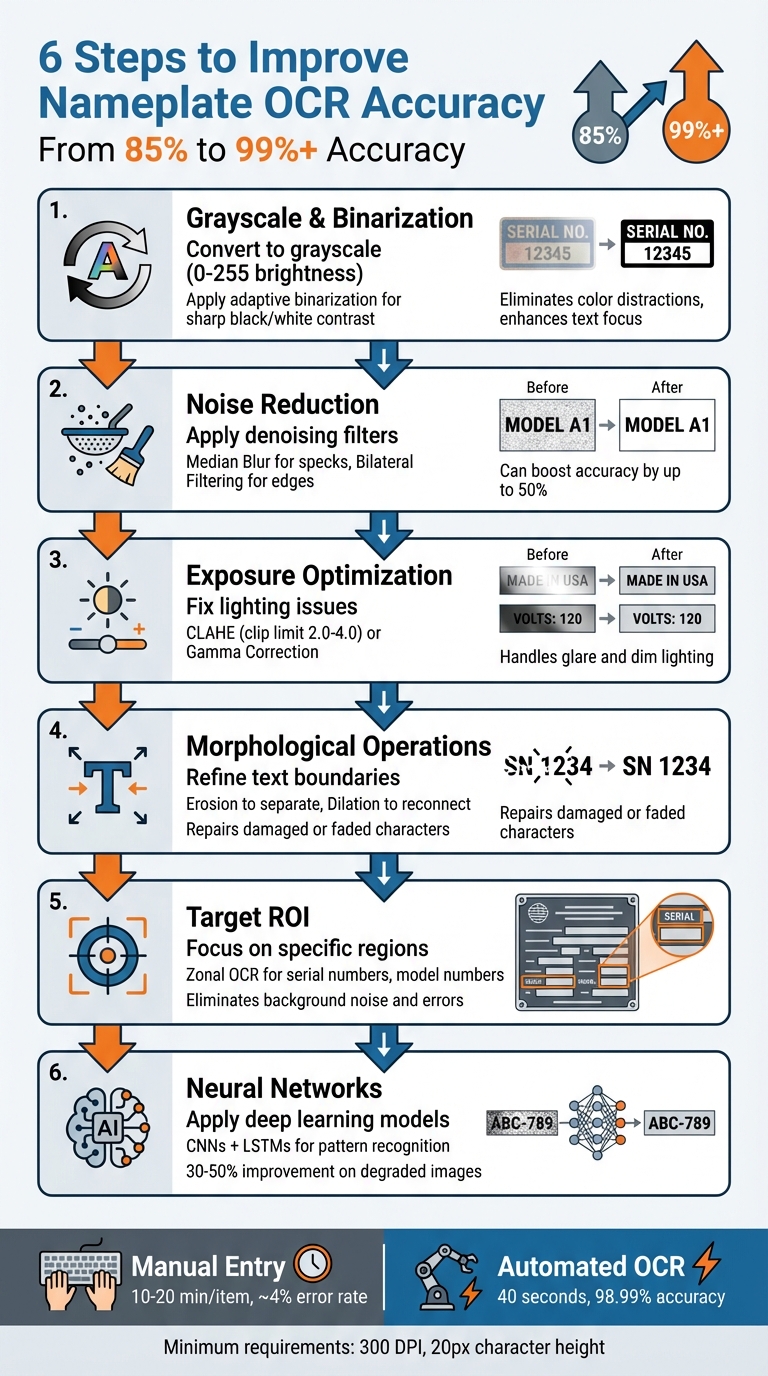
Extracting accurate data from nameplates in industrial settings can be tricky due to poor lighting, wear, and grime. But improving OCR accuracy - from 85% to over 99% - is possible with the right techniques. Here’s what works:
- Convert images to grayscale and apply binarization for better text contrast.
- Reduce noise with filters like Median Blur or Bilateral Filtering.
- Fix exposure issues using tools like CLAHE or Gamma Correction.
- Refine text boundaries using morphological operations such as erosion and dilation.
- Target specific regions of interest (ROIs) to focus on key data like serial numbers.
- Leverage neural networks for better text recognition in challenging conditions.
Each step addresses common challenges like low resolution, uneven lighting, and damaged surfaces, ensuring cleaner data extraction. For tools like AutomaSnap, these methods make ERP data entry faster and more accurate.
Keep reading for practical tips and tools to implement these methods effectively.
I Boosted OCR Accuracy by 90% and Here’s How!
1. Convert Images to Grayscale and Apply Binarization
Transforming color images into grayscale simplifies the process by focusing solely on brightness levels, ranging from 0 to 255. This eliminates the distractions of color while emphasizing the text elements.
“As color information is unnecessary for text recognition, images are typically converted to grayscale. The different shades of gray can result in cleaner backgrounds and sharper text characters.” - Scanbot SDK
Binarization takes this a step further by converting grayscale images into pure black-and-white. This sharp contrast is essential when dealing with nameplates that may have metallic surfaces, shadows, or glare. Many OCR tools, such as Tesseract, rely on binarized images for optimal performance and often handle this conversion automatically. Python developer Max Shouman highlighted its importance, noting that binarization can mean the difference between a failed result and a perfectly accurate one when processing low-quality images.
For industrial nameplates, especially those photographed in tough environments like warehouses or factory floors, adaptive binarization is particularly useful. Unlike global thresholding, adaptive methods calculate thresholds for smaller regions, making them more effective at managing shadows, reflections, and uneven lighting. Advanced deep learning–based binarization techniques can further enhance text extraction accuracy by up to 9% compared to traditional methods.
To implement these methods, start by converting images to grayscale using tools like OpenCV’s cv2.cvtColor function. For images with uneven lighting, adaptive thresholding works best, while Otsu’s method is ideal for uniformly lit images. Make sure your images are captured at a resolution of at least 300 DPI, with text heights of 20 pixels or more, to ensure clear and well-defined characters for binarization.
Platforms like AutomaSnap integrate these preprocessing steps, making it easier to extract critical data from industrial nameplates. These steps also set the stage for additional processes, such as noise reduction.
2. Use Noise Reduction and Denoising Filters
Once you’ve converted your images to grayscale and applied binarization, the next step is tackling noise. Noise - like graininess, specks, and unwanted artifacts - can seriously impact the quality of shop-floor photos. Industrial nameplates, often found in warehouses, are particularly prone to issues like salt-and-pepper noise, dust, and ISO noise caused by poor lighting conditions.
Reducing noise at this stage is critical to achieving accurate OCR results.
“One of the most challenging aspects of applying optical character recognition (OCR) isn’t the OCR itself. Instead, it’s the process of pre-processing, denoising, and cleaning up images such that they can be OCR’d.” - Adrian Rosebrock, PhD, Author and Creator of PyImageSearch
Choosing the right denoising filter can make a huge difference. For instance:
- Median Blur is perfect for removing isolated specks and dots by replacing each pixel with the median value of its neighbors.
- Bilateral Filtering works well for textured or metallic backgrounds, like those on industrial nameplates. It smooths out noise while preserving sharp text edges, unlike Gaussian blur, which can blur character boundaries.
Studies indicate that preprocessing steps like denoising can boost OCR accuracy by up to 50%. When combined with AI-powered enhancement tools, accuracy can improve by an additional 30%, especially for low-quality images.
To get the best results, apply these filters early in your workflow - right after grayscale conversion and before binarization - using tools like OpenCV. For severely degraded nameplates (e.g., faded labels or oil-stained surfaces), deep learning-based denoising networks can reconstruct legible text from images that might otherwise be unreadable. Tools like AutomaSnap incorporate these advanced techniques automatically, making it easier to extract accurate data from challenging photos without manual adjustments.
When done correctly, denoising can boost OCR accuracy from below 70% to over 95%. Just be cautious not to overdo it - excessive denoising can erase small details like punctuation marks.
3. Fix Exposure Problems with Image Optimization
Lighting issues can severely impact OCR performance when dealing with industrial nameplates. Outdoor metal nameplates often reflect glare, while indoor ones may suffer from dim lighting, making text hard to read. Tackling these exposure challenges requires effective correction techniques, which we’ll explore below.
“The problem of overexposure or underexposure on the nameplate further increases the difficulty of subsequent detection and recognition of electrical equipment nameplate information.” - Wu et al., PLOS One
Histogram Equalization (HE) is a standard method to enhance overall image contrast, while Contrast Limited Adaptive Histogram Equalization (CLAHE) focuses on localized exposure problems. CLAHE is particularly useful because it avoids introducing artifacts, especially when using a clip limit between 2.0 and 4.0. For underexposed images, Gamma Correction is another effective tool. By applying gamma values below 1.0, this technique brightens images in a non-linear way, preserving fine text details better than simple brightness adjustments.
Beyond traditional methods, deep learning has opened the door to more advanced exposure correction. In June 2024, researchers Hao Wu, Yanxi Liu, Zhongyang Jin, and Yuan Zhou enhanced the Learning Multi-scale Photo Exposure Correction (LMPEC) algorithm specifically for electrical equipment nameplates. Their study, conducted on 5,000 images with exposure variations ranging from -1.5 to +1.5, employed a PS-UNet++ network. This approach improved SSIM by 5.6% and PSNR by 5.1%, effectively addressing outdoor exposure issues by separating color enhancement from detail enhancement.
Industrial scanning SDKs have also made strides in this area. Many now include real-time exposure feedback, ensuring images are optimized before they’re even captured. Some SDKs take it a step further, automatically applying exposure corrections to create OCR-ready images, even in poor lighting conditions. These advancements not only improve OCR accuracy but also streamline data extraction from industrial nameplates, making them a critical part of the process.
4. Apply Morphological Operations Like Erosion and Dilation
When industrial nameplates suffer damage, the text boundaries often become uneven, making it difficult for OCR systems to interpret them accurately. Morphological operations, such as erosion and dilation, are effective tools for refining these boundaries in binary images, where the text is depicted as foreground pixels against a contrasting background.
Erosion works by shrinking the boundaries of the text, removing edge pixels. This is particularly helpful when characters have bled into each other due to factors like excessive ink, glare, or physical damage. By separating merged characters, erosion enhances the clarity of individual letters, improving OCR’s ability to differentiate them.
Dilation, in contrast, expands the foreground pixels, helping to reconnect broken parts of characters. This is especially useful for text on worn or faded nameplates where strokes may have become fragmented. By filling in these gaps, dilation ensures that characters appear more complete and recognizable to the OCR system.
For further refinement, compound operations like Opening (erosion followed by dilation) and Closing (dilation followed by erosion) can be applied. These methods help remove noise and fill gaps, creating a cleaner and more coherent text structure. Tools like OpenCV make implementing these techniques straightforward. Research indicates that using proper preprocessing methods, including these morphological operations, can improve OCR accuracy significantly - from around 85% to over 99%.
These adjustments are a natural extension of earlier preprocessing steps, helping to ensure the OCR system delivers precise results.
5. Target Specific Regions of Interest for OCR
After preprocessing, you can improve OCR accuracy even more by narrowing the focus to specific text areas instead of scanning the entire image. By targeting specific regions of interest (ROIs) - a technique often called Zonal OCR - you direct the OCR engine to focus on key data like brand names, model numbers, or serial numbers. This eliminates the need for it to sift through irrelevant elements such as logos, decorative designs, or background clutter, which often lead to errors.
Using bounding box detection to isolate these text regions helps the OCR engine focus on the most relevant areas, cutting down on mistakes caused by noisy backgrounds or unrelated details. This is especially helpful on complex nameplates with multiple columns, where the engine might otherwise merge unrelated text or misinterpret the reading order. Breaking down dense images into smaller sections - known as tiling or slicing - can significantly improve text extraction accuracy compared to processing the full image.
To ensure optimal results, make sure characters are at least 20 pixels tall by scanning at 300 DPI. While higher resolutions may seem beneficial, they often add unnecessary processing time without improving accuracy. Additionally, configuring the OCR engine with specific Page Segmentation Modes (PSM) can refine the process further. For example, PSM 7 works well for single text lines like brand or model numbers, while PSM 8 is better suited for isolated serial numbers.
Another effective technique is character whitelisting, which restricts recognition to expected patterns, such as alphanumeric serial numbers. This reduces the likelihood of false readings. Tools like AutomaSnap incorporate these methods to extract structured data (e.g., Brand, MPN, Serial Number) from nameplate photos - even when the labels are damaged or dirty - creating ERP-ready spreadsheets without manual effort.
Finally, set confidence thresholds based on the importance of each field. For critical fields like serial numbers, aim for a confidence level of 95% or higher before approving results. For less critical, descriptive fields, thresholds around 85% may suffice. This targeted approach, combined with earlier preprocessing, significantly boosts OCR precision for industrial nameplates.
6. Use Neural Networks for Better Text Recognition
Traditional OCR systems rely on fixed templates to identify characters, which often leads to errors when dealing with scratched, dirty, or partially obscured nameplates. Neural networks, however, approach this challenge differently. Instead of rigid templates, they use machine learning to recognize characters based on patterns and features they’ve learned, making them far more effective in real-world industrial settings.
Building on earlier preprocessing techniques, neural networks bring an added layer of precision when working with degraded images. Convolutional Neural Networks (CNNs) are particularly good at analyzing spatial hierarchies within images, while Recurrent Neural Networks (RNNs) and Long Short-Term Memory (LSTM) networks excel at processing sequences of text. This combination allows the system to interpret missing or unclear characters based on the surrounding context. For example, an LSTM can predict obscured letters by analyzing the flow of the text. These advanced methods work hand-in-hand with preprocessing steps, addressing the limitations of traditional OCR approaches.
“AI-powered OCR uses machine learning to outdo the old pattern-matching stuff. These tools are way better at handling bad images, weird fonts, and complex layouts.” – Ashwin Singh, Author, DocTrux
The results speak for themselves. AI-driven OCR systems have shown remarkable improvements in accuracy. For low-quality inputs, AI pipelines can boost recognition rates by 30%, while transformer-based architectures have been shown to outperform traditional OCR methods by 25%. In particularly challenging cases, such as poorly lit or faded text on aging industrial equipment, deep learning models can enhance character recognition accuracy by as much as 50%. These advancements make neural networks a crucial part of any strategy aimed at achieving the highest OCR accuracy.
AutomaSnap capitalizes on these neural network capabilities to extract structured data from damaged or dirty nameplate photos. The platform can generate ERP-ready spreadsheets automatically, eliminating the need for manual data entry. By training deep learning models on datasets that include examples of scratches, oil stains, and rust, AutomaSnap ensures robust performance. Additionally, it uses confidence scores to flag uncertain results, allowing for manual review when needed.
Conclusion
Accurate nameplate data extraction relies on a carefully designed, step-by-step process. Techniques like grayscale conversion, noise reduction, exposure correction, morphological operations, targeted ROI selection, and neural networks work together to tackle the unique challenges of OCR in industrial settings.
When combined, these methods can boost OCR accuracy from 85% to over 99%. By addressing environmental and physical noise at the preprocessing stage, this pipeline transforms low-quality images into clean, high-quality data, ready for the OCR engine to process.
AutomaSnap exemplifies how these techniques can revolutionize nameplate OCR. This solution streamlines data extraction and enhances operational workflows. It operates directly from a web browser using a standard smartphone camera - no specialized hardware required. AutomaSnap can extract Brand, MPN, and Serial Number details even from damaged or dirty labels, automatically remove backgrounds, and generate ERP-ready spreadsheets compatible with systems like SAP, Odoo, and Dynamics 365. While manual data entry can take 10–20 minutes per item with an error rate of around 4%, AutomaSnap completes the task in about 40 seconds with an accuracy of up to 98.99%.
The move toward AI-driven document processing is accelerating, with 66% of enterprises already transitioning from outdated systems to modern solutions. For industries managing large inventories, adopting these OCR techniques ensures reliable data and eliminates inefficiencies. Whether you’re developing an in-house system or opting for a tool like AutomaSnap, each step in this process contributes to building a powerful, automated nameplate recognition system.
FAQs
What image quality do I need for reliable nameplate OCR?
For accurate nameplate OCR, start with high-quality images featuring a resolution of at least 300 DPI. Text characters should be a minimum of 20 pixels tall to ensure clarity. Use proper lighting to reduce shadows, and position the camera at a perpendicular angle to the nameplate. Sharp, well-lit, and distortion-free images are key to helping OCR systems extract data efficiently.
What preprocessing steps should I try first for dirty or scratched nameplates?
When dealing with dirty or scratched nameplates, it’s important to begin with preprocessing steps to clean up the image and enhance its clarity. Some effective techniques include:
- Binarization: This process converts the image into a black-and-white format, improving contrast and making the text stand out.
- Noise removal: Methods like Gaussian blur help eliminate unwanted visual noise, smoothing out imperfections.
- Deskewing: Correcting any tilt in the image ensures the text alignment is straight, reducing distortion.
These steps significantly improve text visibility, making it easier for OCR systems to extract information with greater accuracy.
When should I use neural-network OCR instead of traditional OCR?
Neural-network OCR is the go-to choice when accuracy is a top priority, especially for complex or degraded text. These advanced models shine in handling tough scenarios, such as poor image quality, unusual fonts, distortions, or background noise. While traditional OCR performs adequately with clean and well-structured documents, neural-network OCR delivers far better precision. It’s particularly effective for extracting data from industrial nameplates or other challenging environments where advanced text recognition is essential.
Try it yourself
Scan your first nameplate free — no card required
Open the scanner in your browser, photograph a label and watch Brand, MPN, Designation Code and Serial come back as an ERP-ready row. No install, no credit card.