On this page
Struggling with blurry, cluttered, or poorly lit images of spare parts? These issues can wreak havoc on data extraction systems, leading to errors in identifying critical details like model numbers and serial codes. The solution? Image preprocessing.
By cleaning up photos - removing distractions, sharpening text, and correcting lighting - preprocessing transforms unusable images into clear, structured data. This ensures accurate Optical Character Recognition (OCR) results and seamless integration with ERP systems.
Key takeaways:
- Blurry labels: Preprocessing improves OCR accuracy from below 70% to over 95%.
- Background clutter and shadows: Techniques like background removal and contrast adjustment eliminate distractions.
- Dirty or damaged nameplates: Denoising and text enhancement recover faded or obscured details.
For example, a global energy firm processed 100,000 legacy documents in 2025, reducing inventory errors by 65% and achieving 90% accuracy in equipment mapping. Automated tools now make this process faster and more reliable, saving time and cutting costs.
Bottom line: Preprocessing isn’t just about clearer images - it’s about better inventory management, fewer errors, and faster operations.
I Boosted OCR Accuracy by 90% and Here’s How!
Problems with Raw Images in Spare Parts Inventory
Images captured in warehouses or the field often come with their own set of challenges - poor lighting, cluttered environments, and worn labels. These issues make data extraction a lot harder than it should be, turning a simple scan into a frustrating and time-consuming ordeal. Let’s break down the most common problems and how they impact the process.
Blurry or Low-Contrast Labels
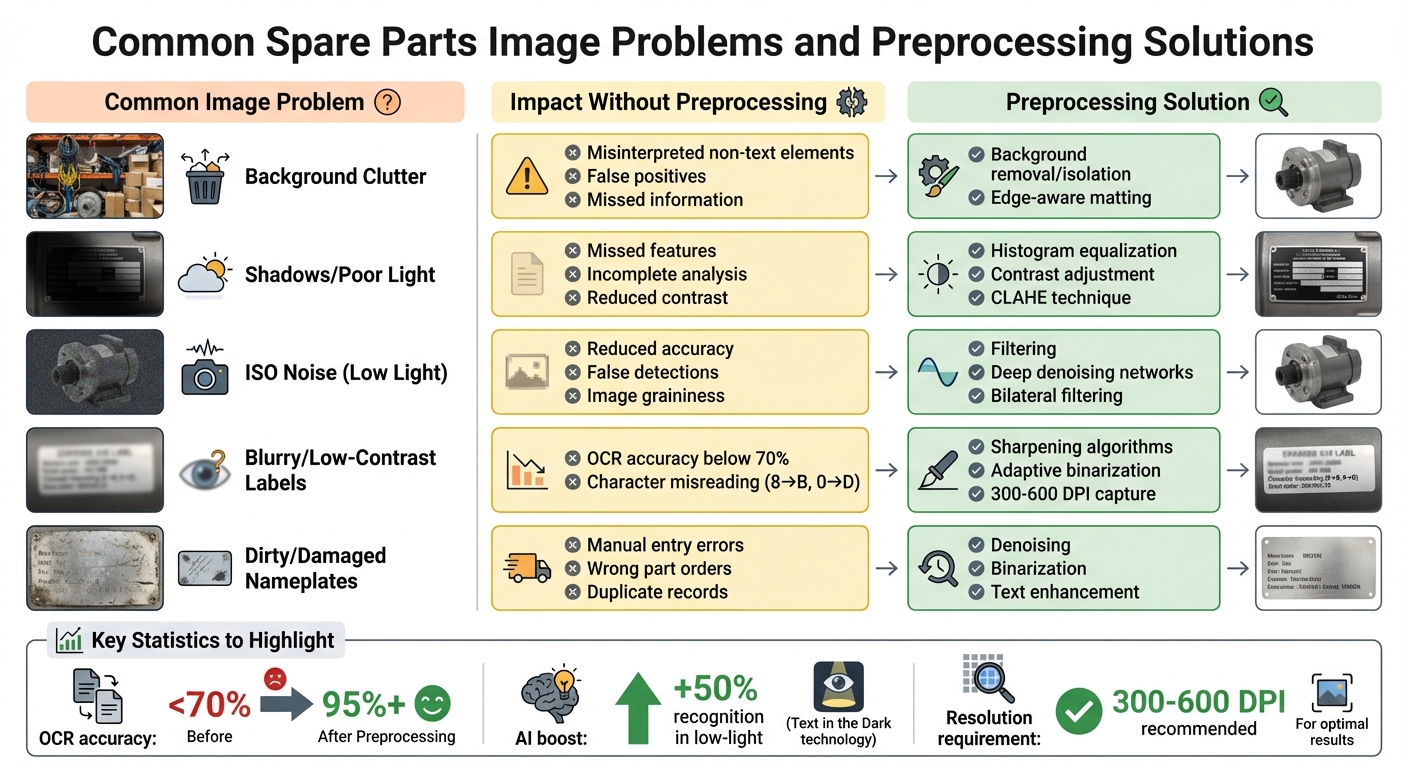
When a camera struggles to focus or lighting conditions are less than ideal, the text on nameplates can blend into the background. OCR (Optical Character Recognition) software relies on sharp, well-defined edges to identify letters and numbers. Without that clarity, mistakes are almost inevitable. For instance, a blurry “8” might look like a “B”, or a faded “0” could be read as a “D.”
The numbers tell the story: OCR accuracy can drop below 70% when processing poor-quality images, compared to over 95% for clear, high-resolution scans. To tackle this, images should be captured at a minimum resolution of 300 DPI, though 400–600 DPI is recommended for smaller fonts. Tools like sharpening algorithms and adaptive binarization (which adjusts contrast locally and converts images to black and white) can also help recover text from less-than-perfect images.
But blurry labels are just one piece of the puzzle. The environment where the photo is taken can create even more hurdles.
Background Clutter and Shadows
Photographs taken in busy environments often include unwanted elements - think shelves, cables, or tools - that confuse OCR systems. These distractions can lead to false positives, where the software mistakes background patterns for text, or worse, misses important information entirely.
“Eliminate distracting background patterns that may interfere with text detection.” – Tech for Humans
Shadows are another major problem. Whether they’re cast by overhead lights or the photographer’s hand, they create dark patches that obscure text. To make matters worse, cameras often increase their ISO settings to compensate for low light, which introduces graininess (also called ISO noise) and further degrades image quality. The result? A double whammy of reduced contrast and added noise. AI tools like “Text in the Dark” have shown promise, boosting recognition rates by up to 50% in low-light conditions. Still, preprocessing steps like background removal and histogram equalization (which balances brightness levels) are critical for isolating text and improving readability.
But even with ideal lighting and a clutter-free background, physical damage to labels can derail the process.
Dirty or Damaged Nameplates
Nameplates in warehouses or on equipment often bear the scars of heavy use - dirt, scratches, fading, and even cracks. These imperfections make it difficult for OCR systems to read long serial numbers or MPNs (Manufacturer Part Numbers) correctly. For example, a worn 16-digit serial number might lead to manual entry errors, resulting in ordering the wrong part or creating duplicate inventory records. Even advanced AI systems can stumble, mistaking dirt or scratches for punctuation marks or extra characters.
While cleaning the plate before taking a photo can help, it’s not always practical in the field. Preprocessing techniques like denoising and binarization are often more effective. These methods filter out surface imperfections and enhance the contrast between text and background, giving OCR tools a better chance at accurately reconstructing faded or damaged characters. Without these steps, reliable inventory management becomes a challenge.
| Common Image Problem | Impact Without Preprocessing | Preprocessing Solution |
|---|---|---|
| Background Clutter | Misinterpreted non-text elements | Background removal/isolation |
| Shadows/Poor Light | Missed features; incomplete analysis | Histogram equalization; contrast adjustment |
| ISO Noise (Low Light) | Reduced accuracy; false detections | Filtering and deep denoising networks |
How Image Preprocessing Fixes Data Extraction Problems
Image preprocessing helps correct distortions in raw images, making them easier for OCR systems to analyze. By removing distractions, enhancing details, and balancing lighting, these techniques ensure accurate interpretation of nameplate data. Here’s a closer look at how these methods solve common issues:
Background Removal for Clean Image Isolation
Removing the background simplifies the image, eliminating distractions like overlapping textures, cables, or shelf patterns. These elements create “feature noise”, which can confuse OCR systems and lead to errors in detecting bounding boxes or interpreting data. Shiny metal parts often reflect surrounding colors, causing misleading reflections that further complicate data extraction. By isolating the nameplate, you create a clear, high-contrast boundary that defines the object’s silhouette. This approach prevents fuzzy or distorted edges, allowing AI models to focus on the part’s shape and texture. Tools with edge-aware matting capabilities are particularly effective at preserving fine details during this process.
Improving Contrast and Sharpness
Enhancing contrast and sharpness is essential for faded or damaged labels. Techniques like Contrast Limited Adaptive Histogram Equalization (CLAHE) improve local contrast without overexposing the entire image. This is especially helpful for nameplates with uneven lighting, where bright areas might wash out while shadowed text remains unreadable. As Joseph Nelson, CEO of Roboflow, explains:
“When using contrast preprocessing, edges become clearer as neighboring pixel differences are exaggerated.”
Methods like contrast stretching and normalization further enhance the image by adjusting pixel intensities or scaling values to a standard range (e.g., 0–255). These adjustments improve OCR systems’ ability to detect character boundaries, which directly impacts text recognition accuracy. Poor contrast can lower OCR precision by 3–8%, and low resolution (below 200 DPI) can cause a 5–15% accuracy drop as characters blur or break apart.
Correcting Haze and Uneven Lighting
Photos taken on shop floors often suffer from poor lighting conditions, including shadows, glare, or haze, which obscure text and make OCR analysis difficult. CLAHE helps by redistributing pixel intensities, making text in darker or unevenly lit areas more visible. Unlike global adjustments, this localized approach adapts to varying contrast levels across different parts of the image. Additionally, ISO noise correction is crucial for smartphone photos taken in low light, as these sensors amplify light but often introduce graininess that diminishes image quality. These corrections improve character recognition, even in less-than-ideal lighting.
Noise Reduction for Clearer Images
Noise reduction techniques like bilateral filtering are effective for cleaning up images while preserving critical details like character edges. For industrial documents or dusty surfaces, median blur is particularly useful for removing speckle noise. However, it’s important to strike a balance - overzealous denoising can erase small but essential details, such as decimal points or commas, which are vital for recording part numbers and specifications. Proper noise reduction ensures OCR systems can extract complete and accurate data from nameplates without missing important elements.
Benefits of Image Preprocessing for Spare Parts Management
By tackling challenges like background clutter and low contrast, image preprocessing lays the groundwork for smoother spare parts management. With clearer images, it becomes easier to integrate data and streamline inventory operations.
ERP-Ready Data Outputs
Image preprocessing takes raw nameplate photos and converts them into structured data formats that can be directly integrated with ERP systems like SAP, Odoo, and Dynamics 365. Instead of manually entering details such as Brand, MPN, and Serial Number into the inventory database, the system extracts and organizes this information automatically. This process not only eliminates transcription errors but also cuts data entry time from minutes to just seconds per part.
AutomaSnap enhances this process by linking each preprocessed, background-removed image to its corresponding data row, creating a visual audit trail within the ERP system. For example, if a warehouse manager needs to verify a part number, they can quickly reference the original nameplate photo. Additionally, the platform offers instant market checks through direct links to eBay and Automanet, making it easier to confirm pricing and demand.
Clean, preprocessed data also powers AI-driven inventory optimization. This can reduce surplus inventory by 20–40% and lower total inventory costs by 15–25%. Facilities using real-time data from optimized images report 20–40% fewer emergencies, as accurate part identification prevents incorrect orders and missed reorder points. These automated workflows not only enhance data accuracy but also unlock further efficiency gains.
Fewer Manual Errors and Faster Processing
Preprocessing doesn’t just create ERP-ready outputs - it also reduces errors and speeds up part identification. By replacing manual data entry with AI validation, preprocessing cuts errors by 30–50% thanks to robust cross-checking. Tasks like contrast enhancement, noise reduction, and OCR validation are handled automatically, significantly lowering the risk of human error in classification and tracking.
The speed improvements are just as impressive. AI systems using preprocessed images can identify parts in under 30 seconds, compared to the 30+ minutes often required for manual searches. AutomaSnap’s automated background removal and data structuring generate spreadsheets quickly, giving staff more time to focus on strategic work instead of repetitive tasks. This automation reduces manual errors by up to 50% and accelerates part identification from minutes to seconds. As a result, businesses can process more inventory with the same workforce - or redirect labor toward customer service and sales efforts.
Conclusion
Our exploration of raw image challenges highlights one key takeaway: effective preprocessing is crucial for accurate data extraction. Raw nameplate photos - often obscured by blur, shadows, or grime - are transformed into clean, structured records that ERP systems can process instantly. This transformation eliminates guesswork and reduces the need for manual checks, which can bog down workflows and lead to costly errors.
Organizations leveraging preprocessed image data have seen tangible results: 20–40% fewer emergency purchases, 15–25% lower inventory costs, and a drastic reduction in processing time - from 10–20 minutes per part to just 40 seconds. These time and cost savings are especially impactful in high-volume settings, where hundreds or thousands of parts flow through systems daily.
AutomaSnap takes this a step further by automating background removal, extracting key identifiers like Brand, MPN, and Serial Number, and generating ERP-ready spreadsheets compatible with platforms such as SAP, Odoo, or Dynamics 365. At a cost of about $0.55 per part (or $0.39 for volumes over 500), it saves approximately 217 hours of labor for every 1,000 parts processed, compared to manual methods costing $27.50 per hour. Features like direct links to eBay and Automanet even enable instant market checks, turning raw data into actionable inventory insights.
But the benefits go beyond faster data entry. Preprocessing lays the groundwork for better demand forecasting, predictive maintenance, and warehouse optimization. For spare parts distributors, asset recovery teams, and manufacturers, clean data at the start drives more reliable decisions at every stage. When the data is right, everything else falls into place.
FAQs
What photo quality do I need for reliable OCR?
For accurate OCR results, it’s crucial to start with high-quality images. The image should be sharp, well-lit, and free of excessive noise or distortion. Blurry or grainy photos can dramatically lower the accuracy of text recognition. To get the best outcome, make sure the image is clear and unobstructed.
Which preprocessing steps help most with shadows and glare?
To tackle issues like shadows and glare in images, certain preprocessing techniques can make a big difference. Methods such as background removal and contrast enhancement are particularly useful. These adjustments work to correct uneven lighting, making the image clearer and minimizing the interference caused by shadows or reflections during data extraction.
How do I verify and import extracted fields into my ERP?
Start by carefully reviewing the data extracted by AutomaSnap, including fields like Brand, MPN (Manufacturer Part Number), and Serial Number. Make sure the extracted fields are mapped correctly to match your ERP system’s structure. Proper mapping ensures a smooth integration process and avoids mismatches.
Once you’ve confirmed the accuracy of the data, you can either export it as an ERP-compatible spreadsheet or sync it directly using an API integration. AutomaSnap also offers built-in tools to help troubleshoot and validate data, minimizing the need for manual corrections and saving you time.